4

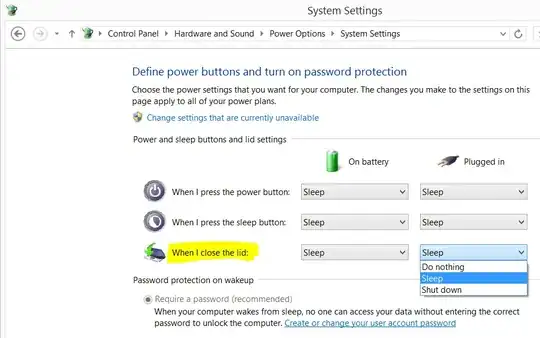
I was expecting to find another option in my laptops power management when I close the lid, but all I found is those 3 options:

  1. Do nothing
  2. Sleep
  3. Shut down

enter image description here

In an old ThinkPad running Windows 2000 I recall having a 4th option: Turn screen off.

Is there a way to accomplish that in a modern Lenovo laptop (model 2015) running Windows 8.1?

Introspective
  • 229
  • 1
  • 7
  • What happens if you click **Change settings that are currently unavailable**? – DavidPostill Feb 06 '15 at 08:13
  • @DavidPostill If I click `Change settings that are currently unavailable` nothing that's relevant to turning off screen happens. All this does is un-gray-out `require password`, `sleep` in power menu and `lock` in picture menu options. Not what I am looking for. – Introspective Feb 08 '15 at 00:50

1 Answers1

4

Answering my own question, thanks to Google, Yahoo answers for Windows 7 which I tried on my Windows 8.1 laptop and verified it works:

Do nothing means "turn screen off when closing lid".

Introspective
  • 229
  • 1
  • 7