0

I'm basically having a basic HTML document and I am trying to link a JavaScript file and a .gif file which is in a CSS file. However, I notice that the networks tab of my browser says that it encountered a 403 error while trying to fetch the file. How may I solve this problem? Take a view at the image below to see how it looks like.
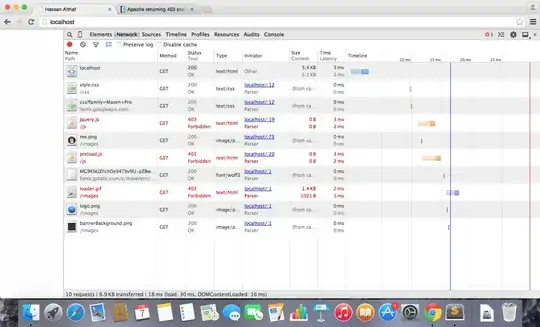
My screen

  • Forbidden means just that - it is either a filesystem permission, or something in the webserver configuration. Have you checked the permissions of /js and its contents, and loader.gif? Does loader.gif have the same permissions as logo.png? – Paul Feb 07 '15 at 13:36
  • I haven't changed any permissions for any files, neither have I got any `.htaccess` files. If you wish to get any further information, feel free to request. Also, I'm using XAMPP. – Abandoned Account Feb 07 '15 at 13:37
  • I asked if you checked them, not if you changed them, – Paul Feb 07 '15 at 13:38
  • How would I do so on OS X? New to OS X. :/ – Abandoned Account Feb 07 '15 at 13:39
  • I am not familiar with OSX but every OS I have seen lets you see permissions by looking at the properties of the file. – Paul Feb 07 '15 at 13:40
  • Yeah, but OS X doesn't. However, I found out that I need to upgrade my OS to the new firmware in order to gain access to that privilege. Apparently, as per Apple, file permissions are changed without the users knowledge. – Abandoned Account Feb 07 '15 at 13:42

1 Answers1

0

It was an OS X Bug.

As per Apple, there was a bug which update file permissions unexpectedly. After I updated my system to the latest version, I was able to edit the file permissions. Thanks for your time everyone!