3

I got a new laptop and did the Windows transfer process to move the old laptop files to the new one. It seems along the way it also transferred a bunch of files in the winsxs folder.

I know this because the new laptop is an Intel Core i7 processor and a bunch of folders with names like "amd64_microsoft-windows" exist in that folder from 2009.

I just did the Windows cleanup process and rebooted, but these folders remain. Can I manually delete them or how can I get rid of them if the manual deletion is not an option?

Peter Mortensen
  • 12,090
  • 23
  • 70
  • 90
jamida
  • 161
  • 1
  • 1
  • 3
  • 2
    Your mistaken AMD64 is the name of the 64-bit x86 extension you don't want to remove files out of the WinSXS. – Ramhound Feb 09 '15 at 23:45

2 Answers2

5

Install the following update:

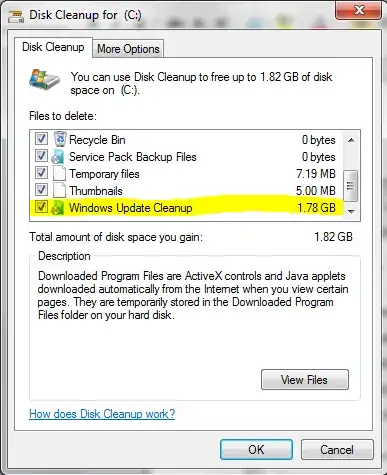
Disk Cleanup Wizard addon lets users delete outdated Windows updates on Windows 7 SP1 or Windows Server 2008 R2 SP1

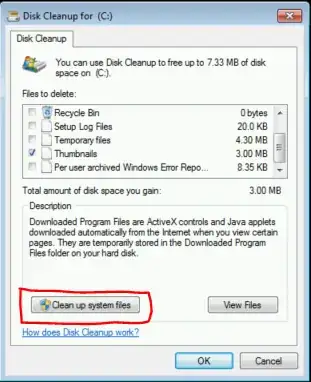
Run Disk Cleanup and now you can uninstall updates (Windows Update Cleanup) which are replaced by newer security updates and are no longer needed. This can save several GB of space.

Enter image description here

Enter image description here

Peter Mortensen
  • 12,090
  • 23
  • 70
  • 90
magicandre1981
  • 97,301
  • 30
  • 179
  • 245
  • Is there any tool to clean this folder since I dont have Windows 7 sp1. (only windows without any service packs. I can't install service packs since no free space) – Ever Think Mar 12 '18 at 15:38
  • 1
    @RageshDAntony no, the update requires Sp1. Use [this tool](https://superuser.com/a/568716/174557) to move some folders from C to drive D to get space to install the Sp1. – magicandre1981 Mar 12 '18 at 16:18
2

You can't get rid of them at all. Many programs are using older versions of the Visual C++ Runtime (and other libraries, of course), for example. That's what this folder is for. It's perfectly normal for it to be many gigabytes in size.

Be aware though that the folder consists of many hard links, so not all programs are able to correctly calculate its size.

Daniel B
  • 60,360
  • 9
  • 122
  • 163
  • 1
    This doesn't explain the fact the files containing amd64 are extremely relevant to his current installation – Ramhound Feb 09 '15 at 23:55
  • 1
    Why would that need any explanation? They're nothing special and just as important as 32 bit libs. Both are used by Windows and programs. Manually modifying the WinSxS folder will likely break stuff, including Windows itself. – Daniel B Feb 09 '15 at 23:58
  • Because he mistakenly thinks they are from his old AMD hardware... – Ramhound Feb 10 '15 at 00:17
  • 2
    Ramhound, you are indeed correct... in between posting this question and reading afterward I since learned that AMD64 is a historical artifact, AMD was the first 64 bit processor so those libraries are named that NOT because they're AMD-specific. However, 2009 seems odd and... this was a fresh install of Win-7 followed by the "windows transfer" (whatever it's really called) and so... either the fresh install put files in there with a timestamp of 2009 or the "windows transfer" moved them and again I'm wondering if the fresh install really needs them. – jamida Feb 10 '15 at 00:41
  • 3
    @jamida - Windows 7 came out in 2009. What is weird about that? **Windows transfer DID NOT transfer those files.** They have 2009 date because thats when they were created, and yes, those components are still useful and should not be removed. – Ramhound Feb 10 '15 at 01:28