2

Wi-Fi direct is supported natively by Samsung galaxy tab S and windows 8.1.

Wi-Fi direct allow far faster transfer than bluetooth and USB2.0 and regular ᴛᴄᴘ/ɪᴘ based ᴡi‑ꜰi (through 802.11ac in my case :-) were both my computer and the tablet is compatible ) and I have a very large iso to transfer which would take hours through USB 2.0 or though my router (because the router is compatible up to 802.11g)

I already know how to transfer files through Wi-Fi direct on my tablet, but I only found how to do it programmatically on windows.

As I am not a windows programmer, what I need to do on windows 8.1 in order to transfer files from the Samsung galaxy tab S?

user2284570
  • 1,799
  • 7
  • 35
  • 62
  • One note : my windows store is broken... And for those who didn’t wanted to read the [Wikipedia article](https://en.wikipedia.org/wiki/Wi-Fi_Direct) Wi-Fi direct work like bluetooth : there is no SSID network. each device communicate directly *(without a rooter)* without using the IP protocol. – user2284570 Mar 22 '15 at 21:07
  • you can use lonovo shareit application for transfering files using wi-fi it can be installed on both mobile and in your pc – smali Mar 25 '15 at 07:30
  • @ali786 it use TCP/IP. Wi-Fi direct take place at the data link layer like bluetooth. – user2284570 Mar 30 '15 at 21:48

1 Answers1

5

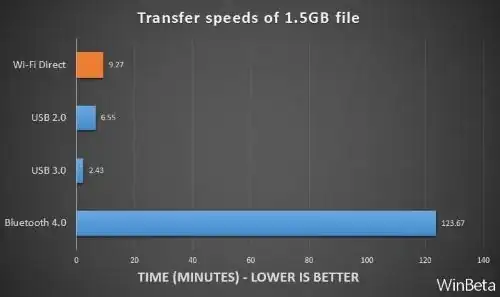
First, transfer speeds according to experiments carried out on the WinBeta website :
chart

Therefore, connecting the computer and device to the router using cable and USB 2 may be a faster solution than Wi-Fi Direct.

Nevertheless, here is my answer.

1. Check for the existence of the Wi-Fi Direct adapter

You should first check if a Wi-Fi Direct adapter is available on your computer. Enter in the Command Prompt (cmd) the command ipconfig /all. If available, you should see an entry such as this:

image

2. If the Wi-Fi Direct adapter exists

Even if the adapter exists, the relative immaturity of the WiFi Direct protocol means that file transfers cannot be completed without a third party app such as Feem, which offers free-to-try Modern and Desktop apps, as well as apps for Android, iOS and Windows Phone 8 at their app store.

Both the Windows 8.1 computer and the device should be connected to your wireless network, and Feem launched on both. You may need to specify the downloads folder in the Settings screen.

I have not personally used Feem, but it is recommended by several well-know websites.

3. If the Wi-Fi Direct adapter does not exist

If your network card is made by Intel and is compatible, you can install Intel My Wi-Fi Dashboard to enable WiFi-Direct.

This should theoretically already have been installed on your computer together with the network driver. If it is not available on your computer, I advise to download from Intel and install the full driver package for your network card.

If still unavailable, you can try to download the stand-alone package from Intel at Intel My WiFi Dashboard Software for Windows 8.

For other network cards, you should search the manufacturer website or get in touch with their Support.

harrymc
  • 455,459
  • 31
  • 526
  • 924
  • I don’t have bluetooth nor ANT on the computer... Also which is the Wi-Fi version used for the test? The answer is yes I already did perform your check which is well-known and my card is compatible with Wi-Fi direct. – user2284570 Mar 22 '15 at 18:48
  • Do you have a visible Wi-Fi Direct adapter and what do you mean by ANT? For details on the test see the article. – harrymc Mar 22 '15 at 19:32
  • See [ANT](https://en.wikipedia.org/wiki/ANT_(network)). Yes I have an interface with Wi-Fi direct in the name. Your article doesn’t tell about the Wi-Fi norm. I guess they probaly used something like 802.11g. But 802.11ac typically provide 867Mb/s theoretical speed vs 200MB/s for USB 2.0. The tablet doesn’t feature USB 3.0. FEM is only for sharing media, not any arbitrary type of files. – user2284570 Mar 22 '15 at 19:51
  • Feem is advertised as transferring all types of files. Also for 802.11ac to reach the speed you mention, many factors need to be exactly right. Don't hope for that much, especially since your link says ANT operates at 2.4 GHz and is not conceived for speed but rather for low-power consumption, just right for a tablet. – harrymc Mar 22 '15 at 20:51
  • You didn’t undertstood : ANT have nothing related to Wi-Fi : it is an alternative to bluetooth. I mentioned ANT because they benchmarked it in you answer. As there is near no gap between between my devices I am sure to reach maximum speed. My question is about if I can use or if there is better than Wi-Fi direct in my case but how I can use Wi-Fi direct. Concerning Feem it require a rooter so it can’t be Wi-Fi direct. – user2284570 Mar 22 '15 at 21:09
  • 1
    My answer was that you need a 3rd-party product. Some parts of the answer may be too elementary for you, but think about future readers. Feem is recommended by some, if it applies to your devices. The possible speed is whatever your combined hardwares allow, unpredictable except by trying. – harrymc Mar 22 '15 at 21:10
  • Feem applies to my devices but this is definitely not P2P Wi-Fi direct related. I read everywhere windows 8 had built-in support for Wi-Fi direct in it's built-in applications and it is at least [true for the API](https://msdn.microsoft.com/en-uk/library/windows/desktop/dn457944(v=vs.85).aspx). Though, I am not against using third party products. – user2284570 Mar 29 '15 at 17:29
  • Feem uses the network for the handshake, but afterward this is real Wi-Fi direct. P2P does not relate, unless your intention is to create an ad-hoc wireless hotspot on one computer, for which there are more than one product, and the resulting wireless network is most probably as fast as Wi-Fi direct. – harrymc Mar 29 '15 at 18:11
  • And Wi-Fi direct handshakes performs like bluetooth : there is no need for a third device at all. – user2284570 Sep 04 '15 at 09:44