6

I have two folders in Windows 8.1. The first folder, a, has 50 .jpg files numbered 01.jpg through to 50.jpg. My second folder, b, has the same amount of .jpg files named in the exact same manner.

My goal is to merge these two folders, but rename the files in b 51.jpg through to 100.jpg so that they stay in the same order.

Giacomo1968
  • 53,069
  • 19
  • 162
  • 212
Max
  • 77
  • 1
  • 3
  • 3
    Can you please add details on what operating system you are using to this question? – Giacomo1968 Feb 27 '15 at 07:33
  • This question on SoftwareRecs.SE is relevant. The answers there might help: http://softwarerecs.stackexchange.com/q/11389/6834 – Tymric Feb 27 '15 at 10:58

7 Answers7

13
  1. Select all the files from a folder. Rename the first file from the selection as a- numbering will take place on its own.
  2. Similarly rename b folder as b-
  3. Then move files from b folder to a. (Asuming you have sort on name)
  4. Again rename files as img-
    You will have the numbering as img-1.....
Nikitesh Kolpe
  • 438
  • 2
  • 5
  • 15
  • 1
    It matters which file is the first to get renamed, so it'd be good instruct renaming the first file in the selection, given that it's sorted. – Louis Waweru Feb 27 '15 at 07:38
  • -1 cause it is simply a solution to do it manually, which in my opinion has nothing to do with a super user... – Oliver Friedrich Feb 27 '15 at 08:36
  • @BeowulfOF You could probably use voice command to "automate" it a bit more. It might be a bit cumbersome, but it still gets the job done and it's probably the easiest/quickest solution that doesn't require any specific or additional setup. – Mario Feb 27 '15 at 08:41
  • manually renaming 100 files is definitely slower than using a script and onboard-tools... easiest maybe. – Oliver Friedrich Feb 27 '15 at 08:42
  • 2
    @BeowulfOF Typing the new name happens once... The other selected files will automatically get updated. It's actually much faster (mostly mouse work) and safer (supported by the undo button) for many than editing and running a script. – Louis Waweru Feb 27 '15 at 11:38
  • 1
    I had no idea any GUI file browser had multi-file rename via selection semantics like this. Will have to try that in some GNU/Linux ones. (or just keep using `prename s/foo/bar/ *.jpg` to throw perl regexes at my file renaming problems. :) – Peter Cordes Feb 27 '15 at 15:30
13

Windows 8.1 have PowerShell build-in, so you can use something like this:

1..50|Rename-Item -Path {'{0:00}.jpg'-f$_} -NewName {'{0:00}.jpg'-f($_+50)}

In the above, the first 0 in {0:00} specifies the parameter index, and the second 00 specifies the format as two digits padded with zeroes.

user
  • 29,449
  • 11
  • 99
  • 144
user364455
  • 2,979
  • 2
  • 13
  • 15
4

This would probably be better asked on SoftwareRecommendations.SE. But here are my recommendations.


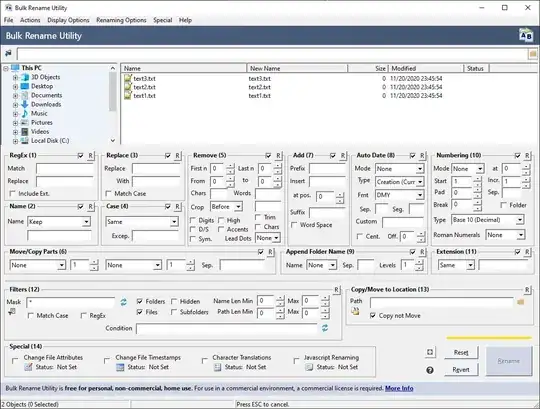
I have used the free Bulk Rename Utility on many occasions and found it to be very helpful. It's a little cluttered but extremely powerful.

Bulk Rename Utility


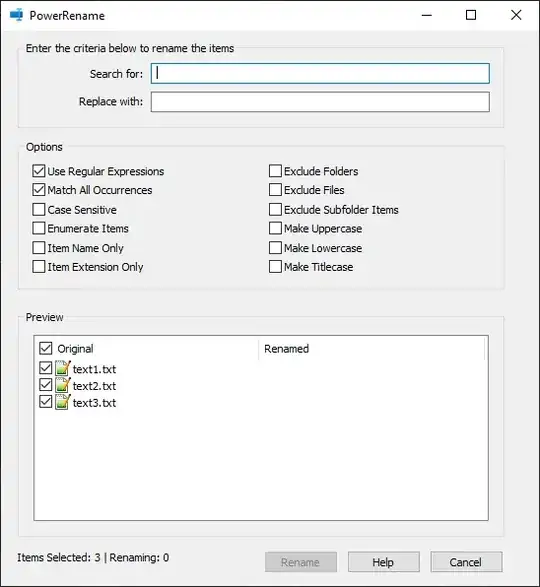
There is also PowerRename from Microsoft as part of their open source PowerToys suite. This is much less cluttered but slightly less powerful in some ways. However it does have support for RegEx renaming!

PowerRename

Keavon
  • 1,151
  • 1
  • 13
  • 23
  • +1 for this. This is also my go-to tool for bulk renaming. The beauty of this tool is that one can 'preview' the result first, and the filelist pane allows renaming "all files but one/N" easily: Ctrl-A then just Ctrl-Click to unselect those you don't want to rename. – pepoluan Feb 28 '15 at 14:07
  • +1 for informing me about https://softwarerecs.stackexchange.com/. I had no idea that existed. – Feckmore Mar 06 '15 at 21:32
3

Highly recommend IrfanView. It has the most amazing customization for bulk renaming files.

More details here: http://www.irfanview.com/faq.htm#Q13

Sam P
  • 131
  • 3
2

This is old and maybe too complex, but in CMD.exe you could solve it like this:

@ECHO OFF
SETLOCAL ENABLEDELAYEDEXPANSION

SET COUNTER=1
FOR %%A IN ("a","b") DO (
    SET FOLDER=%%A
    FOR /F %%F IN ('DIR /B /ON !FOLDER!') DO (
        SET FILE=%%F
        COPY !FOLDER!\%%F c\!COUNTER!!FILE:~-4!
        SET /A COUNTER= !COUNTER! + 1
    )
)  
Oliver Friedrich
  • 587
  • 1
  • 4
  • 12
0

I'd recommend http://www.advancedrenamer.com/ as an alternative "easy-button" answer. I actually use it all the time for batch-renames where I need a certain pattern, or need to remove silliness from other people's mashed-up filenames ;-)

NateJ
  • 236
  • 1
  • 2
  • 8
0

Similar to Niki above use DOS or the CMD utility.

In DOS C:\FolderA> (move to folder with A files)
Rename all the files in one go REN \*.jpg A-\*.jpg

go to B folder using CD - change directory
Rename all the files in one go REN \*.jpg B-\*.jpg

Then copy b-files to A folder.
Copy B\*.jpg c:\FolderA\

Nifle
  • 34,203
  • 26
  • 108
  • 137