Possible Duplicate:
On Windows 7, is there a command prompt line that can start cmd as an administrator?
Is it possible to force cmd.exe to always run with administrator rights?
Possible Duplicate:
On Windows 7, is there a command prompt line that can start cmd as an administrator?
Is it possible to force cmd.exe to always run with administrator rights?

In Windows Vista/7 follow these steps to always run the command prompt as an administrator:
Click Start. Type Command. Right-click Command Prompt, and then click Properties.
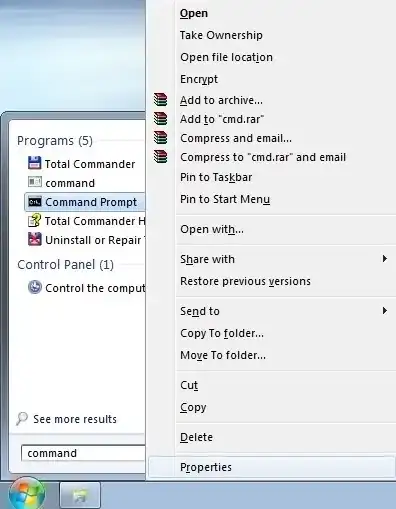
On the Shortcut tab, click Advanced.
Select the Run as administrator checkbox.

Click OK twice.
Now, when you launch a Command Prompt from the Start Menu, UAC will prompt you for administrative privileges.

If you are in Windows Vista or Windows 7:
This method will run any application as administrator.

If you're using Windows XP, you could create a short cut to cmd.exe in the Quick Launch area and then right click -> Properties and change the Target field. You would preface the command with runas /noprofile /user:DOMAIN\USERNAME
The full text of the command on my computer is
C:\WINDOWS\system32\runas.exe /noprofile /user:DOMAIN\USERNAME %SystemRoot%\system32\cmd.exe


