1

I have read many posts about Intel turbo boost technology and I am still a little confused. I get how it works and I even went as far as turning it off but it didn't seem to do anything. When I disabled turbo boost in my bios it still would make my CPU jump above it's 3.3 GHz max. So because that didn't work I just went back into my bios and left it enabled hoping that Intel knows what it is doing.

Now I do a lot of BOINC processing in my spare time when I am not home (Seti@home and others). I've seen my Intel processor hit Ghz of 3.73 and I believe higher, but I don't remember exactly. My main concern is how hot my CPU is getting. I've registered temps as high as 83 degrees Celsius. Normally tho when doing processing it is bouncing somewhere between 60-77 degrees Celsius. I am assuming that is the Intel technology boosting it and then reducing it when it hits higher temps.

My actual question is, is this safe? Are temps of 80+ dangerous? For reference when I am just gaming, WoW on ultra settings, in Ashran, only make my CPU hit 60 degrees Celsius max.

On a side note, my GPU is always a very constant low temperature, so I have that going for me. Which is nice.
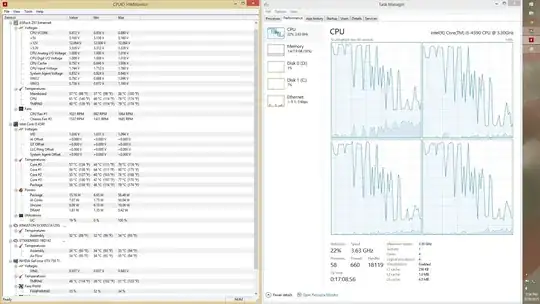
Screenshot of Task manager and temps

Hennes
  • 64,768
  • 7
  • 111
  • 168
Warsum
  • 56
  • 1
  • 3
  • Your CPU shouldn't be getting that hot but it's within the operating temperature – Ramhound Mar 28 '15 at 20:57
  • Even though turbo boost is overclocking it? – Warsum Mar 28 '15 at 22:05
  • Intel CPUs are designed to take advantage of that feature. So **Yes:** they shouldn't be running at near the highest operating temperature they are design to sustain themselfs at. – Ramhound Mar 28 '15 at 22:07
  • With windows systems you can stop the turbo (if you so desire) in the Power Options, Advanced Settings, Processor Power Managment "Maximum Processing State" set to 99% instead of 100%. I assume linux has some methods also where the OS drivers can control it. Works fine to let things purr along slower and cooler, although like ramhound said your still within the capability for it. Intel throttles CPUs at about 100*C which slows them and lets them cool down. It might be a bit high, but they survive it mostly. – Psycogeek Mar 29 '15 at 03:05
  • I would just like to add to this. I went into my BIOS and edited my fan speeds. In the picture above the CPU fan only hit about 1100 RPMS. Well the max speed of it is somewhere around 2200. My BIOS were set to use my fan "conservatively". I was actually able to manually tell it based on temperature how much is should use. I did 45 C = 50%; 55 C = 65%; 60 C = 75% 65 C = 100%. That seems to have dropped the temperature significantly. I also turned off the turbo boost so it runs at 3.23 GHz now. – Warsum Mar 29 '15 at 06:52
  • http://superuser.com/questions/218243/what-is-the-safe-temperature-range-for-a-core-i5-processor – Uğur Gümüşhan Apr 05 '15 at 07:50

1 Answers1

0

My i5 underclocks itself when it reaches 95 celcius. I think it would turn off the pc when it hits 100 celcius. Don't worry about heat until you reach 90+

Uğur Gümüşhan
  • 1,356
  • 2
  • 15
  • 32