12

Is there any command get all the properties of a file including its encoding format (this piece of information is really important to me) on Windows ? I'm looking for something similar to stat in Linux

I'd prefer using a command that can be used in command-prompt or a batch script although I know its possible with Powershell.

Dhiwakar Ravikumar
  • 2,109
  • 5
  • 25
  • 39

3 Answers3

14

You can use WMIC feature to do that.

For example :

F:>> wmic datafile where Name="anyfile.txt"

to get all information about anyfile.txt. You can use CMD and powershell too to using WMIC. And you can use GET parameter to get a specified information.

For Example:

F:>> wmic datafile where Name="F:\\ekojs.txt" get Description,Path,Status,Version

EDIT : Try using this before to check the WMIC functionality :

F:>> wmic datafile /?

To get a help how to using it.

Command :

wmic datafile where Name="F:\\ekojs.txt" get Description,Name,FileType >> eko_wmic.txt

Output in eko_wmic.txt:

Description   FileType       Name          
f:\ekojs.txt  Text Document  f:\ekojs.txt  

Hope this'll help you out..

  • 8
    I keep getting an error "No Instance(s) Available" – Dhiwakar Ravikumar Apr 05 '15 at 10:47
  • 1
    you run this command using cmd ? or powershell ? – Eko Junaidi Salam Apr 05 '15 at 10:50
  • Sorry I've mistake command at first answer. but I've edited it. hope it run well. – Eko Junaidi Salam Apr 05 '15 at 10:56
  • 1
    I used "cmd" with Administrative Privileges. wmic datafile /? didn't help :( Can you please edit your answer and give me the exact query you used to get information of some file with the ouput as well. ? – Dhiwakar Ravikumar Apr 05 '15 at 11:01
  • Check my edited answer... – Eko Junaidi Salam Apr 05 '15 at 11:06
  • btw, what's wrong with your error using that command ? keep getting an error "No Instance(s) Available" ? – Eko Junaidi Salam Apr 05 '15 at 11:12
  • Yes what is the meaning of "No Instance(s) Available" ?If I just type "wmic" it takes me to the following location- wmic:root\cli>wmic – Dhiwakar Ravikumar Apr 14 '15 at 10:13
  • Yes you can do that, you get in to `wmic` and type after `wmic:root\cli>` and do the command in my answer. About `No Instance(s)` you can try to fix that using powershell and type :`Get-HotFix` – Eko Junaidi Salam Apr 14 '15 at 10:20
  • Any `extra spaces` or you get your code using `copy/paste` may come in to error `No Instance(s)` :) – Eko Junaidi Salam Apr 14 '15 at 10:22
  • @EkoJunaidiSalam - I am getting this `"No Instance(s) Available"` error with command `wmic datafile where name="file.txt" get creationdate`. I opened Powershell and typed: `Get-HotFix`. It returns a list of all HotFixes (updates, service packs, security updates...) **that have already been installed**. Is there a specific "KB" numbered HotFix that I need? – Kevin Fegan Jan 09 '16 at 04:36
  • 1
    From [Dale C](https://superuser.com/users/863386/dale-c): The linked response, https://superuser.com/questions/1024034/no-instances-available-error-with-the-wmic-command, has the resolution to “No Instance(s) Available” where the full escaped file path to for the file name has to be used. – fixer1234 Jan 17 '18 at 22:12
  • 2
    @DhiwakarRavikumar: I ran into the "No Instance(s) Available" error too. I silved it by escaping all backslashes with an extra \. – Freeze Dec 21 '18 at 15:25
  • wmic works for me, but results are unreadable - its a mixture of headers and some values. Is there any way to suggest wmic to use newlines at some point? – hans Mar 14 '19 at 08:55
  • I have read rest of your answer and I use `get` with specified values. – hans Mar 14 '19 at 08:59
5

To build on the previous answer. You can use wmic datafile to get info about a file, but you have to provide the full path and double-up your slashes like so

wmic datafile where Name="F:\\anyfile.txt"

This gives an unreadable mess in the console, as you'll see:
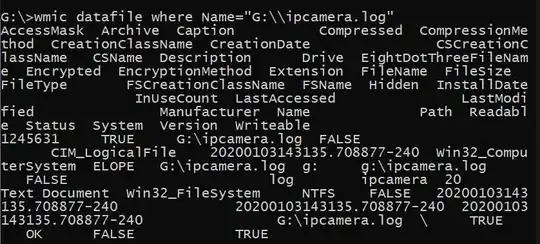
what a great way to render data, wmic

However if you pipe this into a text file, it's pretty legible

wmic datafile where Name="F:\\anyfile.txt" >> fileprops.txt

enter image description here

Fortunately, wmic can format the info as a list, and then it is actually pretty useful.

wmic datafile where Name="F:\\anyfile.txt" list /format:list
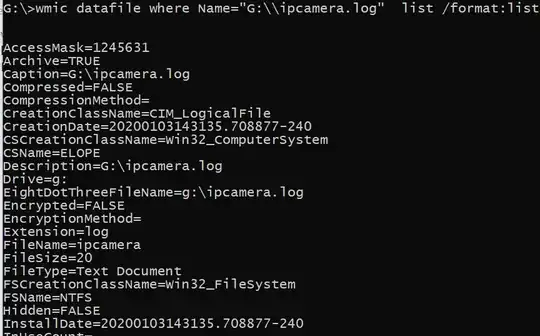
enter image description here

You can then provide these properties only for a simplified view, note that you must remove the list keyword.

>wmic datafile where Name="G:\\ipcamera.log" get Hidden,FileSize,Name  /format:list


FileSize=20
Hidden=FALSE
Name=G:\ipcamera.log

A little piece of trivia, wmic was the foundation for what eventually became PowerShell!

FoxDeploy
  • 341
  • 3
  • 6
  • 1
    The wmic list display is quite useful; I used to use that same command but without the list part. For info on folders/directories, use `wmic FSDIR where Name="C:\\path\\to\\folder" list /format:list`. Online docs: https://ss64.com/nt/wmic.html – Rublacava Sep 20 '20 at 01:06
1

You can use any scripting language that can use COM objects such as vbscript and powershell to access a files extended properties (Title, Duration, Frame rate, etc.) using the Shell.Application object. Unfortunately, cmd does not have a direct way to access the Shell object, you will have to piggyback on some other scripting language to access the Shell object.

Running the following command from a cmd prompt window will display the duration of the video file in 100ns units (not milliseconds).

PowerShell -Command "$FilePath='C:\Videos\Test.mp4'; Write-Host ((New-Object -COMObject Shell.Application).NameSpace((Split-Path -Parent -Path $FilePath))).ParseName((Split-Path -Leaf -Path $FilePath)).ExtendedProperty('System.Media.Duration')"

Additional information about the command can be found at Enumerate file properties in PowerShell

Safwan
  • 51
  • 3