0

It is possible to install Windows Server 2008 R2 on a 3TB GPT hard drive on a Dell Vostro 260?

I know that hard drives must be GPT to recognize over 2TB so I formatted it GPT thinking I did everything correctly.

I have two 500GB partitions and the rest (1794MB) unallocated.

I wish to install 2008 to the first 500GB partition, keep the second partition for Linux (I may or may not install depending on how 2008 is) and partition the rest for data later.

But when I went to install to my partition it says it cannot be installed to GPT.

I tried to use Rufus to make a USB device but if I select GPT and use my ISO I get an error, do you need a special version of Windows for GPT?
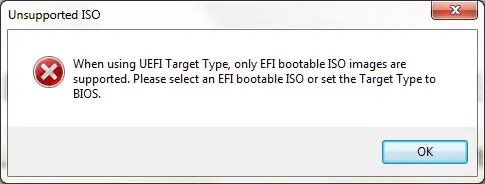
error

I can format the flash drive as NTFS and boot it, but I get the same problem it telling me I cannot install to a GPT partition style drive.

While researching about UEFI I found this BIOS mod and installed it.

https://www.bios-mods.com/forum/Thread-Dell-Insprion-620-Vostro-260-AHCI-request?page=2
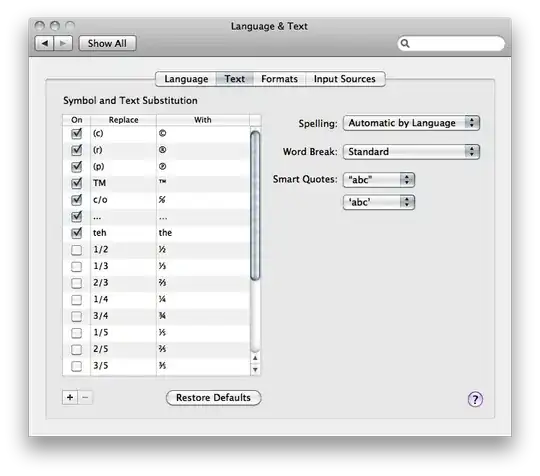
Rufus Config

user324747
  • 406
  • 1
  • 5
  • 19
  • which ISO have you used? Also post a picture of your Rufus setting – magicandre1981 Apr 11 '15 at 06:12
  • It's an ISO with different versions of Windows Server. Rufus was all default, except the ISO path and partition type changed to GPT for the USB. Regardless, I uploaded a screenshot.Do you need a GPT formatted USB boot medium to install Windows to a GPT formatted hard drive? – user324747 Apr 11 '15 at 18:57
  • Do you need AHCI to boot in UEFI mode? – user324747 Apr 11 '15 at 18:59
  • is this a selfmade ISO? Also change the filesystem to FAT32 for UEFI boot. – magicandre1981 Apr 12 '15 at 08:07
  • http://www.jaxidian.org/update/2011/01/28/199/ says to move some files in the ISO. The self made and original ISOs give the same message. It says the selected ISO cannot be used with FAT32 – user324747 Apr 12 '15 at 16:38
  • use a proper MSDN ISO and select FAT32. If you get an error in rufus, post a picture of the error. – magicandre1981 Apr 12 '15 at 17:27
  • Does it matter which ISO if my system cannot boot UEFI? The error message is very vague. It just says it cannot be installed because it's GPT. A better error would have been it cannot be installed because the hard drive is GPT and the system is not booted in UEFI mode. Is the Vostro 260 UEFI compatible? – user324747 Apr 12 '15 at 19:24
  • normal MSDN ISOs are UEFI bootable, so use a proper MSDN ISO. I habe no idea if your Dell supports UEFI. check the manual. – magicandre1981 Apr 13 '15 at 04:26

1 Answers1

0

I was able to install Linux to this hard drive and boot from it.

It told me to make a biosboot partition and that there wasn't enough space to install grub (Guess 3TB isn't enough) so I installed the bootloader to my current Windows 7 boot hard drive.

LinuxInstallGPT

I still would like to install Windows 2008 but I am not sure if that is possible. But I know that any posts that claim it's a hardware limitation and not Windows are wrong.

EDIT: May 30, 2020: I was thinking about this question today and still never fully looked into this. Ironic today I seen this question pop up whose answers may contain beneficial information: Can a bios based windows 10 system access gpt disk drive?

user324747
  • 406
  • 1
  • 5
  • 19
  • Not only was I able to install and boot off this hard drive, but I was able to do so on a single partition larger than two TB. I would have not minded having to partition the hard drive. I have my data 3TB HD in my other machine partitioned anyway. – user324747 Apr 12 '15 at 02:13