I have two text documents with 1000 lines each and there are (let's say) 50 lines that are highlighted as different. Is there a way to view/extract only those lines that differ, either with a filter or perhaps a way to sort to get the differences at the top?
Asked
Active
Viewed 3.6k times

2 Answers
14
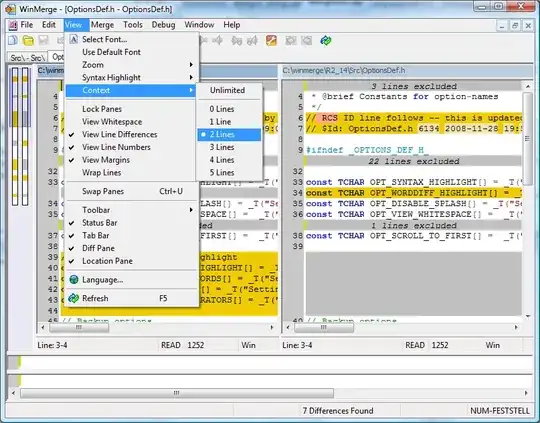
Use the WinMerge 2011 fork instead which has this feature:

Karan
- 55,947
- 20
- 119
- 191
-
Any way to enable this feature by default? – Andreas Haferburg Jan 05 '17 at 11:58
-
@AndreasHaferburg: There might be, but I'm not sure. The WinMerge forum (or even the specific thread I linked to above) would be the best place to ask. If you find out how to do it, don't forget to leave a comment or add it above as well to help others. – Karan May 16 '17 at 02:55
-
The problem for me came that I somehow enabled the feature by accident, and didn't know why I was only seeing the differences. Then stumbled onto this superuser. So I was able to figure out how to undo it. – Robert Koernke Jan 05 '21 at 19:32
5
For today, with version 2.16.16.0 x64 of WinMerge you can show only rows that differ by Ctrl D keyboard shortcut which is the same as menu: View -> Context difference -> Switch all rows.

pbies
- 2,757
- 3
- 21
- 23