how do I automatically kill a ghost nick (e.g. i got disconnected then reconnected) on connect with using xchat? I'm on freenode.
Asked
Active
Viewed 2.9k times

2 Answers
19
Assuming all versions work the same, you can put /msg nickserv ghost name password as a connect command under server settings for freenode.
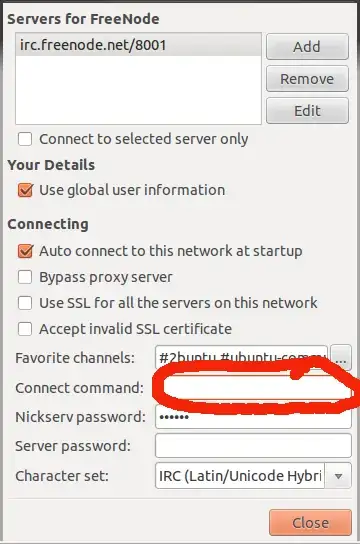
To change your nick as well is a little tricky - type in
/msg nickserv ghost username password
Then CTRL SHIFT u a
/nick username
As one line. This should do both commands one after another

jokerdino
- 2,465
- 1
- 23
- 33

Journeyman Geek
- 127,463
- 52
- 260
- 430
4
Try "/msg nickserv ghost ", without the quotes.

Enrico Tuvera Jr
- 1,085
- 6
- 20
- 32
-
2or rather, `/msg nickserv ghost [username] [password]`. This could be followed up by a `/nick [username]` so you don't end up with the wrong name anyway. – Phoshi May 29 '10 at 17:10
-
This is the standard way, not an automatic way as requested. – Robin Green Jun 26 '11 at 13:25