13

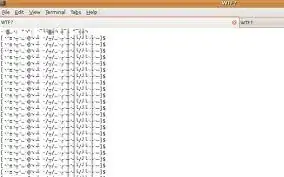
While logged in to a remote ssh session, sometimes I do cat to the wrong file (a binary or a diretory) and the display converts to gibberish. The only way out is to close the terminal and open a new one, which frustrates me because usually there is a lot of state related to the current terminal already.

Update: while I received great answers, a little problem persists. See this follow-up question.

What can I do?
enter image description here

flybywire
  • 4,030
  • 10
  • 42
  • 55
  • As it happens in the title thread, I suggest you to correct the word "gibberish". I can not edit your post to correct only one character, as you know. – Sopalajo de Arrierez Feb 11 '14 at 20:49

8 Answers8

24

/usr/bin/reset might also do the trick.

Bombe
  • 358
  • 2
  • 7
5

An old trick that works on almost any other Unix type system, too:

echo "^V^O"

That is: Type the word echo than a double quote character then press CTRL and type the kev v then press CTRL and type the key o (the letter not zero) then type another double quote character then press RETURN.

Paidhi
  • 351
  • 1
  • 8
4

Try "Reset" or "Reset and clear" from the the "Terminal" menu in the screenshot.

agnul
  • 575
  • 2
  • 7
  • 19
1

Try entering setterm -reset

finnw
  • 131
  • 3
1

use reset, manpage: http://www.penguin-soft.com/penguin/man/1/reset.html

cating a textfile works too if i remember correctly

Ledhund
  • 111
  • 4
1

Usual commands for these situations:

  • stty sane
  • eval $(tset -s) # or eval tset -s
  • echo ^[c # You will need to type ^v ESC to get ^[ in bash command line

Hope this helps

njsf
  • 239
  • 2
  • 4
1

If you start using a practice of

less filename

instead of

cat filename

You would not land into such state often (ever?).

nik
  • 55,788
  • 10
  • 98
  • 140
0

when running screen in your ssh session helps as well, as that one will disable the more uncommon font switching escape sequences (but will of course still work with normal programs). The main reasons for screen are different, usually (switching between programs, disconnecting and getting back to your original programs when reconnecting, etc.)

running reset (or one of the escape combos) works if you ever happen to run into a garbled screen (or a screen that refuses to echo input) again...

mihi
  • 3,377
  • 20
  • 26
  • 1
    The problem with running screen is that you lose useful stuff from the terminal like mouse scrolling. – therefromhere Jul 22 '09 at 10:15
  • 1
    IBTD. Yes, mouse scrolling won't work, but you get working keyboard scrolling and keyboard copy&paste that does not have problems with "dialog borders". Other programs (like "less") kill mouse scrolling, too. – mihi Jul 22 '09 at 17:27
  • In gnome-terminal, `less` doesn't kill mouse scrolling - it just scrolls the text in `less`, not the scrollback. – u1686_grawity Jul 26 '09 at 14:28
  • Hmm, I just installed `gnome-terminal` (2.22.3 from Debian Lenny) and I cannot scroll `less` with the mouse; the scrollbar is just grayed out as with `screen`. Just as with every other terminal emulator available. as soon as `less` or `screen` is closed, the scrollbar gets active again. – mihi Jul 26 '09 at 20:57