0

I am trying to install Windows on my computer. I previously had Ubuntu and Kali Linux installed. I am able to boot up from my USB. I agree to all the legal stuff and when it comes to installing Windows, I get this error:

Setup was unable to create a new system partition or locate an existing system partition

I have tried several different times and used several different USB booting tools.

Help would be greatly appreciated, thank you.

Here's a link to a picture of my error:
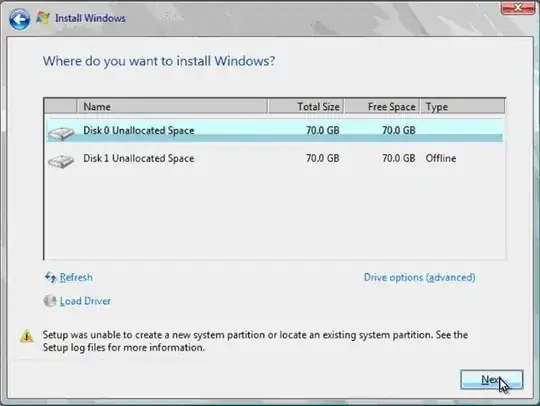
enter image description here

securityghost
  • 109
  • 1
  • 1
  • 15
  • You need to mark the disk 0 partition as the primary partition. – Ramhound May 26 '15 at 16:00
  • Is the system in UEFI mode, or Legacy BIOS? I also find it a little odd that you have "70GB" disks, what kind of disks are these? – Ƭᴇcʜιᴇ007 May 26 '15 at 16:07
  • This isn't a picture of my computer, just my error at the bottom. And i don't know.what is uefi and bios mode – securityghost May 26 '15 at 16:11
  • 2
    @jo900 - Do some research. You never made any mention that this wasn't your screnshot. You will have to provide us exact information from your system if you want specific help in that case. Of course the error in question, is caused by, not having an primary partition. – Ramhound May 26 '15 at 16:24
  • Have you tried clicking on Drive options(advanced)...? – smali May 27 '15 at 04:17
  • If it helps anyone, the "setup log files" are at: `%WINDIR%\Panther` more specifically (for disk) `setuperr.log` – msb Apr 09 '16 at 01:20
  • I had the same problem but none of these solutions worked for me. I posted my solution in another thread because OP there was more thorough in what he tried before posting, covering all things I tried before finally solving my issue: http://superuser.com/questions/945600/windows-installation-couldnt-create-a-new-partition-or-locate-an-existing-one/1063268 – msb Apr 09 '16 at 03:15
  • See also http://superuser.com/questions/789255/setup-was-unable-to-create-a-new-system-partition-or-locate-an-existing-system-p – That Brazilian Guy Jan 28 '17 at 17:50

2 Answers2

1

Here's the easiest way to do this:

  1. Press Shift+F10 to open the command prompt
  2. Run DISKPART to start Diskpart
  3. Run LIST DISK to list disks available to wipe
  4. Run SELECT DISK 0 replacing 0 with the number of your disk
  5. Run CLEAN to fully wipe your hard drive
  6. Run EXIT twice to exit both Diskpart and Command Prompt
  7. Hit Refresh at the Where do you want to install Windows prompt
  8. Select the newly formatted drive to install Windows on.
  9. Continue with the standard Windows install
  10. Done
td512
  • 5,031
  • 2
  • 18
  • 41
0

Press Shift+F10 and use Diskpart tool to create a new partition.

https://support.microsoft.com/en-us/kb/300415

Open Command Prompt with Shift + F10 and use these steps to create a new partition manually:

  1. diskpart
  2. list disk
  3. select disk [the disk number you want to install windows on, usually 0]
  4. list partition
  5. delete partition [all partitions (if there are no partitions, that's okay, just skip it.)]
  6. clean
  7. convert gpt [only if you use uefi]
  8. create partition primary
  9. format fs=ntfs quick
  10. active

Close the command prompt, Click refresh on the Windows setup. You can now continue without any problem.

Mustafa Can
  • 191
  • 5