2

There's a document I'd like to keep handy at my desk for reference purposes (a contact list for everyone at my company). I'd like to clear all the paper from my desk and store it digitally, but I'd also like it to be available at the click of a button, and more importantly, I'd like it to disappear just as easily. I'd also like to avoid setting it as my computer's wallpaper.

What I'm imagining is something that behaves like the Start menu: click it, and it pops up. Click anywhere else (or hit escape), and it's gone.

Does anyone know of something like this?

Ryan Lue
  • 465
  • 4
  • 15
  • You want to show an image when you click a button, then hide it later? – Jon May 28 '15 at 05:16
  • 1
    refer to this http://superuser.com/questions/23375/windows-7-taskbar-create-popup-menus?rq=1 Create shortcuts with Number and name as text – AEonAX May 28 '15 at 05:54
  • Thanks @AEonAX - it's close, but not quite what I'm looking for. What I want is not a customizable menu, but a file preview. – Ryan Lue May 29 '15 at 03:19

1 Answers1

1

A simple solution would be to pin it to the taskbar:

Step 1 - Create and pin a generic exe

  • right click anywhere on desktop
  • hover over "new", then click "text document"
  • rename the new file to: Contacts.exe
  • Right click on the file and select "Pin to Taskbar"

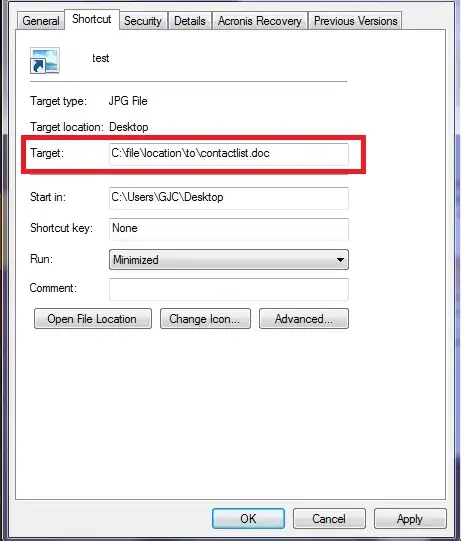
Step 2 - Change the target

  • Hold Shift + right click on contacts.exe in the taskbar
  • Go to "properties"
  • Insert the file location of the actual contact list into "Target"
  • Delete the original contacts.exe on the desktop (it is no longer needed)

    enter image description here
    You can now open and close the file with the click of a button.
    This solution doesn't give you the hover option you are interested in, but it is easy to implement.
    You can also change the icon if you like to make it more identifiable.

Cosco Tech
  • 673
  • 1
  • 4
  • 17
  • I had actually thought of something close to this solution, but what I really want is a file _preview_. I'd like to view the contents of the file without the delay of starting excel and loading it for editing. (I'm not averse to exporting to png or something first, for the purposes of this hack.) – Ryan Lue May 29 '15 at 03:22