2

How I can create footnotes in MS Word? I do not want to create a page footer because that would appear in all pages, but I need to write some things as footnotes on a specific page.

I want to add more details in about some terms, but the details are not part of main text. For example like this:

enter image description here

T.J. Crowder
  • 1,129
  • 2
  • 13
  • 32
hasanghaforian
  • 923
  • 3
  • 14
  • 33
  • "Feuilleton" seems to be "a part of a newspaper or magazine devoted to fiction, criticism, or light literature". Can you explain further what it is you want to do exactly? – Karan May 31 '15 at 03:21
  • @Karan Thank you for your attention,I added more details.Please see my edited question. – hasanghaforian May 31 '15 at 03:41

1 Answers1

4

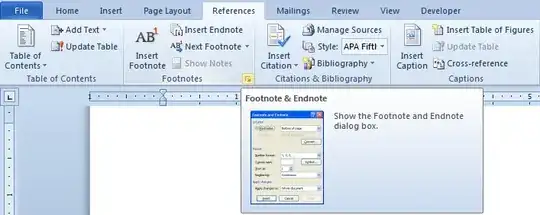
Inserting a footnote (which is what you seem to mean as shown in your image) is quite easy and can be done using the appropriate button on the References tab:

1

You can also access further footnote-related settings as shown below:

2

3

Further reading/viewing:

Karan
  • 55,947
  • 20
  • 119
  • 191