I am looking to set up an excel spreadsheet to calculate cattle weight gain per day. We weigh our cattle once a week so column A will be a date and Column B will be the weight on that day(day of the week may change). I want excel to give me the average daily weight gain. is the a formula to do this or a pivot table? Please post the "how to" to make this work. Thank you
Asked
Active
Viewed 2,485 times
1

-
Is that the total weight of all cattle in column B? Or do you have the individual weight per animal? If so, how do you identify the animal? – teylyn Jun 06 '15 at 05:39
2 Answers
1
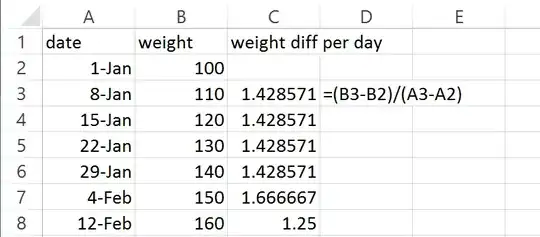
With Date in column A and weight in column B, row 1 has labels, use this in C3 and copy down
=(B3-B2)/(A3-A2)
Note that row 6 has only 6 days difference, row 7 has 8 days difference. The formula calculates weight difference divided by number of elapsed days.

teylyn
- 22,498
- 2
- 40
- 54
0
Let's assume you have headers, so your first row of data is row 2. You can add another column, say, C. Start in row 3 with the formula:
=B3-OFFSET(B3,-1,0)This will give you the difference between the last weight and the previous. Drag this down to the last row. Format what you have as a table. To do this highlight your table, then go to the Insert ribbon, and click on insert table. Verify the range for the table. On the table design check the Total Row checkbox. Click the dropdown arrow at the bottom of the daily weight change column and select "Average". When you need to add data, just click on the last row (not a cell, but the row label) and on the ribbon click Insert > Insert Sheet Rows. You may need to resort by date, but you won't need to copy formulas. Excel will do this automatically.

BillDOe
- 1,681
- 2
- 16
- 33
-
Offset? Really? Why use a volatile function when you could just use B2 instead? And that does NOT calculate the weight difference per day. – teylyn Jun 06 '15 at 05:47
-
Teylyn, well at least thanks for not downvoting my answer. In my experience using a relative cell reference in a table causes problems when you delete a row. Of course, if this gentleman never needs to delete a row, that's not a problem. I think I like your answer better. – BillDOe Jun 06 '15 at 05:55
-
I see your point. That issue needs to be taken up with Excel in general, though. I've trained myself to avoid Offset wherever possible, because this volatile function will cause workbook slowness. Data samples in forum questions are never the whole picture. Offering volatile functions may be fine for a small data set, but may choke the OP's workbook. Try using Index instead of Offset. In this case it would be `=B3-INDEX(B:B,ROW()-1)` – teylyn Jun 06 '15 at 06:12
-
You all are awesome!!!!! I was able to get teylyn's to work. So excited!!!!!!! Where to I put the =B3-INDEX(B:B,ROW()-1) to try BillOer's? I would like to see them both work and see the difference? – Chuck Jun 06 '15 at 08:08
-
ok I got the other one to work I added (A:A) looks like =B3-INDEX(B:B,ROW(A:A)-1) But the last is a negative number I also get an error message on all Column numbers?? @teylyn – Chuck Jun 06 '15 at 08:22
-
You have changed the formula to something completely different. Even the original formula will not calculate what you describe in your question. It will just return the difference between the current row and the previous row's weight, not the average daily difference. Just stick to B3-B2 instead. It does the same thing. The whole Offset or Index exercise is only for geeks dealing with deleting rows. If you don't delete rows, you don't need either Offset or Index. – teylyn Jun 06 '15 at 08:53