11

gnome3, while again trying to copy apple shortcomings as if it is the holy grail, made windows opened as modal from other windows un-resizable for no reason at all. and un-movable, because why would anyone ever want to read what was behind without closing the window, right? Modal child windows remain a fixed size and when you move it, it moves the parent window along.

This makes it impossible to use things like the gnome disk manager, where you MUST resize the benchmark window to be able to see anything in the graph. or you must resize the window to be able to read the table text in the smart monitoring report.

I've already searched for a extension (as this is the normal flow of using gnome nowadays. They break something, some good person have to go and write an extension to make things exactly as before, everyone has to waste time searching for the workarounds...), and found nothing.

completely broken application

Here is an example of a window that I cannot resize or move on gnome 3.16+ the columns were never resizable, I don't know why. but I was always able to resize that window until gnome 3.16.

Thomas Dickey
  • 8,632
  • 3
  • 22
  • 31
gcb
  • 4,764
  • 11
  • 53
  • 73
  • This question is still getting votes and I pity the fool using gnome still. I am a happy KDE user now. – gcb Feb 26 '20 at 06:07
  • 1
    in all honesty, I upvoted because of the rant, with which I totally agree :) – Matthieu Oct 26 '20 at 09:11

1 Answers1

7

It's true that this behavior can be unpleasant on some applications.

Luckily, it can be disabled with simple this gsettings tweak:

gsettings set org.gnome.shell.overrides attach-modal-dialogs false

Edit: on newer versions of gnome you also need to use this:

gsettings set org.gnome.shell.extensions.classic-overrides attach-modal-dialogs false

Modal windows will be then detached and resizable.


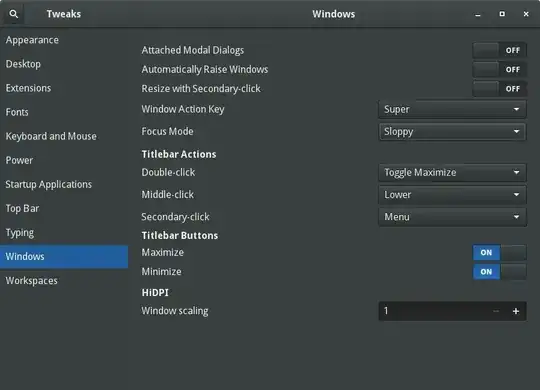
on gnome-tweak-tool the setting is windows > Attached Modal Dialogs. First item on the screen shot. enter image description here

Max Matti
  • 201
  • 2
  • 12
Toine42
  • 449
  • 2
  • 7
  • thanks! for some reason i can't resize most of the windows after this. might be changes in the application as well. but it is a relieve to be able to move them at least – gcb Jun 08 '15 at 09:27
  • 1
    facepalm-moment: Was going to send a patch for this setting to gnome-tweak-tool, and as soon as i grep'ed the code, of course, it was already there... embarassing. i completely missed it. it is under `windows > attached modal dialogs` ...still can't resize anything though. – gcb Jun 08 '15 at 09:39
  • 3
    After spending literally hours on that annoying Gnome design flaw, perhaps someone will find this helpful: On [SLED 12](https://www.suse.com/releasenotes/x86_64/SUSE-SLED/12/), they chose to introduce yet another, additional location for the `attach modal dialog` option. In `dconf-editor`, under `org.gnome.shell.extensions.classic-overrides`, there's `attach-modal-dialogs` **again** - you have to disable it there, too. I found this after doing `CTRL-F` in `dconf-editor`, so you might want to consider doing the same when you're not sure how your distribution of choice handles Gnome settings. – stef77 Jul 15 '15 at 13:51
  • Same, debian 9 I needed to use dconf-editor as the default was overriding the gnome tweak tool settings of user. I think that's a bug in the tweak tool imo @stef77 – akahunahi Jan 23 '19 at 18:09
  • The tweak tool did it for me on ubuntu jammy 22.04 Cheers! – wuxmedia May 13 '22 at 16:12