0

My laptop wakes up automatically exactly 12 hours after it was put into a sleep mode. It has this behavior from the beginning, it is very annoying, especially then the lid is closed and it wakes up unattended and overheats. It has Windows 7 Home Basic, runs from an outlet. Windows Event Log shows "Power-Troubleshooter" events, but specifies the cause of the wake up as "Unknown". In the Command prompt "powercfg -lastwake" does not provide any information either. Wake up timers are disabled. Wireless LAN is disabled, LAN card is not allowed to wake the computer. Neither scheduled task is allowed to wake up the laptop. Laptop is Dell Inspiron N5010.

How can I stop this behavior?

Thank you.

Santa Claus
  • 13
  • 1
  • 3

2 Answers2

2

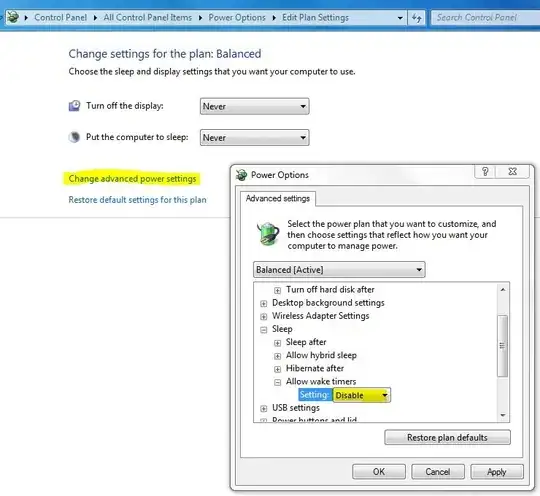
Please try Power Options as below:

enter image description here

More Details: How To Prevent Your Computer From Waking Up Accidentally

Jatin
  • 399
  • 2
  • 12
  • 3
    Please read the question again carefully. Your answer does **not** answer the original question. OP already said in his question "Wake up timers are disabled." – DavidPostill Jun 18 '15 at 06:35
  • Hi, guys. Yes, I have disabled the wake timers some weeks ago. Sadly, it did not stop my laptop from waking up. I also have already checked everything that is mentioned in the article, that Jatin recommended, and nothing worked so far. – Santa Claus Jun 18 '15 at 23:06
1

Check the Administrative Tool, Task Scheduler to see if there is a scheduled task that you can edit, disable or remove.

Or change the power settings from Sleep mode to Hibernate. Sleep mode does not power the laptop off. Hibernation does.

HighTechGeek
  • 1,642
  • 13
  • 14
  • Hi, HighTechGeek. I have already checked all scheduled tasks, none of them is allowed to wake the computer. I do not want to remove them all to see if that may help. Also I would like to use sleep mode instead of hibernation. – Santa Claus Jun 18 '15 at 23:07
  • Have you checked your BIOS to see if Wake on LAN (WOL) is enabled? Have you gone to the NIC card properties in Device Manager, clicked the Power Management tab and unchecked “Allow this device to wake the computer”? There are so many places Wake events can occur, it's difficult to troubleshoot when you broadly state everything has been disabled and checked. Obviously that is not the case. Windows Update can wake a computer to reboot it if patches have been installed automatically. Antivirus scans can be scheduled. All kinds of apps have scheduled checks for updates, etc. – HighTechGeek Jun 19 '15 at 00:14
  • This person seems to have had a similar issue with 12 hours as well. There is a "scorched earth" solution if nothing else works for you: http://superuser.com/questions/464578/laptop-randomly-waking-up-hibernate-low-battery – HighTechGeek Jun 19 '15 at 00:19
  • Hi, HighTechGeek. I did not say that everything was checked. I am just trying to find what I missed. Yes I checked BIOS, there is no Wake on LAN option there. In the Device Manager, LAN card is disallowed to wake the computer. Windows Update is disabled. Antivirus scans are not scheduled. I doubt it is an application trying to update, because it happens not at some specific time of the day, but exactly 12 hours after I put laptop into a sleep mode. This is not hibernation, cos in my laptop it is set after 36 hours, not 12. – Santa Claus Jun 19 '15 at 02:58
  • Did you look at the question I linked to? "This is a solution for those who want their computers to never wake from sleep on their own anymore and simpler solutions have not worked. Nothing other than tapping a button or opening the cover will wake it. Not the planned tasks which are scheduled to wake up your system such as Windows Media Center or the unknown causes. The only negative I’ve found is that a laptop will not wake to hibernate if the battery is getting too low. It will just go dead and any unsaved information will be lost." -Paul Kinslow – HighTechGeek Jun 19 '15 at 21:42
  • Thanks, HighTechGeek, I did look at the question. I do not quite like the solution proposed, because I would like my laptop to be able to hibernate, should the battery runs out. I am still hoping there is another solution, like maybe a way to find a process that wakes the laptop. I will use that method as a last resort. It is weird that Windows does not keep track of processes that can wake a computer. And it is even more weird, since the wake timers are disabled. – Santa Claus Jun 19 '15 at 23:04