I'm running the Windows 10 preview on my Surface 3 laptop. I am trying to install the software for my Samsung Galaxy S6. When I try to install it, I get an error dialog saying "This app has been blocked for your protection" that only has the option to close. I right clicked on the install file and selected "Run as Administrator" and I still continue to get this error. I can't seem to find any way around it. Ideas?
Asked
Active
Viewed 1.5e+01k times
23


-
1Can you post a screenshot of this message? Is there a "More info" button? – gronostaj Jun 19 '15 at 15:21
-
Thanks for all the responses. I was trying to get this to work on a broken phone before I sent it back but didn't get a response that resolved it in the 1-2 weeks I had. Some of these solutions might work but I have no way anymore of verifying them. My replacement phone doesn't have this issue... maybe part of the problem was that the phone wasn't working right, I don't know. – Kris Nov 24 '15 at 16:32
3 Answers
14
This solution require you be logged in as an Administrator user. If you are on a domain and not an Administrator on the domain itself this won't work. Once you are done running this program you should re-enable Windows SmartScreen.
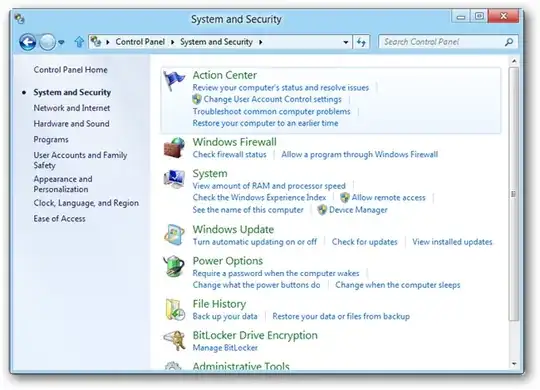
You need to locate System and Security within Control Panel. How you access this is slightly different on certain builds of Windows 10. The following screenshot is from a build that used the traditional Control Panel and only used as guidance.
Once you have located the System and Security section of the Control Panel you need to click on Action Center. You can also gain access to this window by right click on the flag icon in your taskbar if it is there.
Once you have Action Center locate the Windows SmartScreen option and disable it. You will be given a UAC prompt which you will have to approve.

Once you have confirmed the program is able to run, and you are done with your task, enable the Windows SmartScreen feature again.

Ramhound
- 41,734
- 35
- 103
- 130
-
Might the middle option be more useful, after I forget to change it back? – AaronD Jun 19 '15 at 19:17
-
If you want it's your computer. After enough people run it, or you run it enough, the prompt won't come up anymore anyways – Ramhound Jun 19 '15 at 20:24
-
I was thinking to change from the default of requiring an admin (the OP's problem) to not requiring an admin but still asking, instead of never asking. I would rather forget it on the middle setting than the bottom one. – AaronD Jun 19 '15 at 20:28
-
Serial down voting is bad people, three answers, all down voted by the same person not a single comment – Ramhound Mar 14 '16 at 11:26
13
==SOLUTION==
Click Start, type cmd and run with admin privileges. Then input your desired program path:
C:\Users\my_user\Desktop\program.exe
p.s. note to 'downvote brigade': it's better you allowed other people to get help from this post, instead of clicking "delete & downvote".

T.Todua
- 3,815
- 9
- 42
- 57
-
1How is this better than directly running target executable as administrator? – gronostaj Nov 24 '15 at 22:05
-
-
1How is that useful for the purpose of this question and how does it solve the problem OP is facing? – gronostaj Nov 27 '15 at 22:38
-
This does not seem like a serious answer. Running the installer from an command prompt elevated to Administrator would result in exactly what the author already tried and reported as not working for them. – Ramhound Feb 24 '16 at 01:14
-
6
-
8I would not have believed this answer if I had not seen it happen (on two machines). Running an exe as admin directly from explorer is blocked, but running cmd as administrator and then running the exe is allowed. – sgmoore May 26 '16 at 19:07
-
@Ramhound it may not seem a serious answer but it does work in situations where running the target executable with the Run As Administrator option fails. I've been in this situation even using a Domain Administrator account. – roaima Jul 12 '16 at 10:23
-
I tried to unblock on file properties, run as administrator from conetxt menu, and other tricks but not worked. But running from prompt worked. Note: you have to run as administrator! – rkawano Jul 23 '16 at 21:47
-
-
1This is a workaround, not a solution. FWIW, these symptoms can also arise when you're simply trying to run (not install) Computer Management, IIS Manager, and Task Scheduler. – Mike Sherrill 'Cat Recall' Jun 07 '17 at 11:12
-
Downvoted because answer didn't solve my problem and because of too much bold text. – Jonas Sourlier Nov 24 '18 at 09:22
-
9
There is usually a Ignore this warning or similar text in the bottom right hand corner of the dialogue. The thing that makes this text hard to see is that it has a very similar color to the Windows theme color. Clicking that link will temporarily turn off Windows SmartScreen

td512
- 5,031
- 2
- 18
- 41
-
3This is a better solution than turning off SmartScreen protection, although it can be quite bothersome if it happens often. – Nzall Jun 19 '15 at 16:31
-
I only suggested my method because the author said the option wasn't there. – Ramhound Jun 19 '15 at 20:25
-
1No, turning off SmartScreen is really the better option, since it's total crap. SmartScreen is a misdesign (just like the on/off UAC in Windows) and conveys a false sense of security, which is worse than no security -- instead of being wary about what programs to run. – Damon Jun 19 '15 at 23:13