0

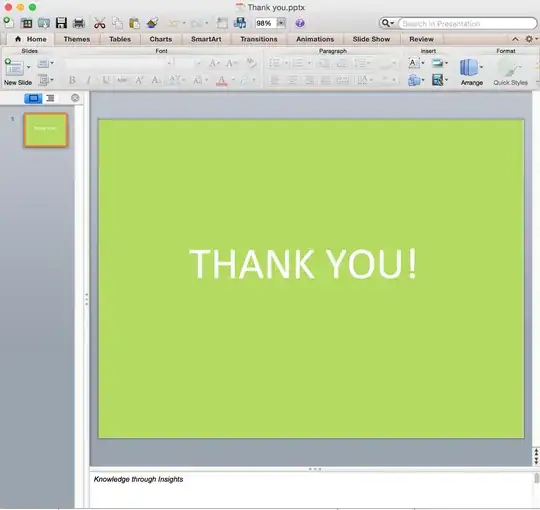
It is the original slide in Powerpoint for Mac 2011 osx
And it is how it looks in Powerpoint 2013 on Windows
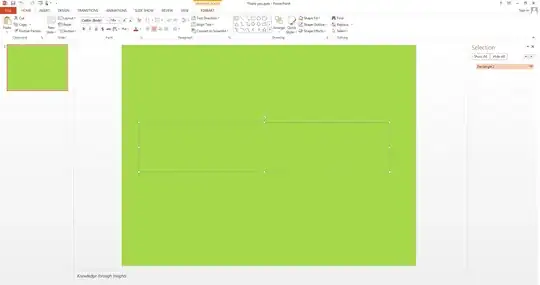
win

Here is the version information of my Powerpoint for Mac
enter image description here

I have googled this problem but fail to find a solution.

How can I fix this incompatibility?

EDIT

If you want to see the file, download it here

Anthony Kong
  • 4,868
  • 11
  • 48
  • 80
  • Put the file on OneDrive/Dropbox or someplace else where others can download it to have a look. – Steve Rindsberg Jun 22 '15 at 19:07
  • @SteveRindsberg Here is a link https://www.dropbox.com/s/239oay4ekr2vil2/Thank%20you.pptx?dl=0 Thanks – Anthony Kong Jun 23 '15 at 05:00
  • Thanks for posting the file. I see the same thing here. It looks to me as if the shape (rectangle) with the text is corrupt. The shape still contains the text, but if you attempt to change the text color, it shrinks down to 0 height. If this is just happening to the one slide and doesn't repeat itself with new slides, I'd delete the slide, re-create it and move along. It's not typical of what happens between PPT Mac and Windows. – Steve Rindsberg Jun 23 '15 at 14:40

0 Answers0