1

I'm using a Windows 8.1 Surface Pro 1.

I've had this same problem using Windows XP, Windows 7, and Windows 8 in the past, however I don't remember how I solved the issue.

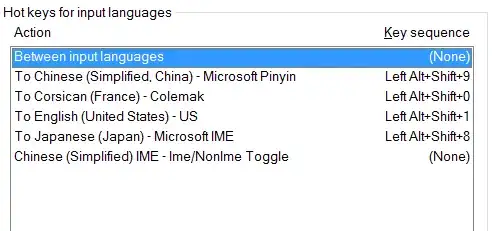
I setup my keyboard so that pressing ALT+LEFT SHIFT+# allows me to switch languages. This is what the configuration looks like. http://i.imgur.com/IV7tKCv.png

However, whenever my system boots up again, it returns to the following configuration.
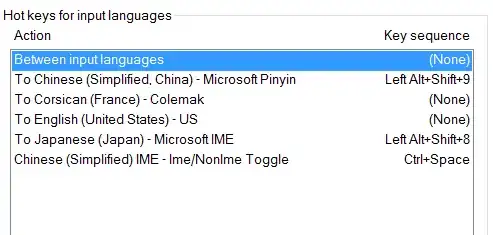
http://i.imgur.com/IB2Gtlu.png


How do I stop this ridiculous behavior?

JDG
  • 111
  • 3
  • 1
    Possible duplicate of [Windows 10 loses settings of keyboard layout shortcuts (hotkeys for input languages)](https://superuser.com/questions/1096411/windows-10-loses-settings-of-keyboard-layout-shortcuts-hotkeys-for-input-langua) – i3v Jul 03 '19 at 23:05
  • [This](https://superuser.com/a/1111605/135260) is likely to be the answer. This question is quite old (older than that one, and it's related to a different version of Windows), but the issue itself is even older - I've seen some related [posts from 2012](https://answers.microsoft.com/en-us/windows/forum/all/custom-hotkeys-to-change-input-language-disappear/66d1d89d-e5dc-41e1-a8b3-48d596ab8e11). – i3v Jul 03 '19 at 23:12

0 Answers0