6

I want to extract usernames from a JSON data file.

 [{"username": "Cobra", "user_id": 146231486, "event_type": 2,
"title": null, "class_id": 4211, "war_state" : null,
"superpower_expire_date": 1441178060.0, "role": 3, "event_state": 2,
"avatar_id": 4211, "avatar_type" : 2, "recent_gifts": []},
{"username": "Divineshadow", "user_id": 1622533959, "event_type": 2,
"title" : null, "class_id": 1887, "war_state": null,
"superpower_expire_date": null, "role": 2, "event_state" : 2,
"avatar_id": 1887, "avatar_type": 2, "recent_gifts": []}, {"username":
"-TheLastTrojan_", "user_id" : 1387569472, "event_type": 2, "title":
null, "class_id": 1887, "war_state": null, "superpower_expire_date" :
1440106625.0, "role": 1, "event_state": 3, "avatar_id": 1887,
"avatar_type": 2, "recent_gifts": [] }, {"username": "-TheLostHero-",
"user_id": 246900216, "event_type": 2, "title": null, "class_id": 1887,
"war_state": null, "superpower_expire_date": null, "role": 3,
"event_state": 2, "avatar_id": 1887,  "avatar_type": 2,
"recent_gifts": []}, {"username": "_The-Divineshadows-Minion_",
"user_id": 347494612 , "event_type": 2, "title": null, "class_id":
3382, "war_state": null, "superpower_expire_date": null , "role": 3,
"event_state": 2, "avatar_id": 3382, "avatar_type": 2, "recent_gifts": []}]

I want to pick all the usernames in the order in which they appear in the JSON data file and compile it in a column of Excel sheet or text file. The output file should look like this:

  1. Cobra
  2. Divineshadow
  3. -TheLostHero-
  4. _The-Divineshadows-Minion_

Any help with how I can manage to do achieve my desired output file?

WR20
  • 61
  • 1
  • 1
  • 2

4 Answers4

7

You could do this in notepad++ with search replace (or anything that has fairly good search replace). In this case, choose the regular expression search mode:

Search: .+?username": "(.+?)".+?\}

Replace: \1\n

This puts the usernames on a line by themselves, which you could then drop into Excel to put a line number at the beginning if you wanted, or use the TexFX notepad++ plugin to add them.

Paul
  • 59,223
  • 18
  • 147
  • 168
1

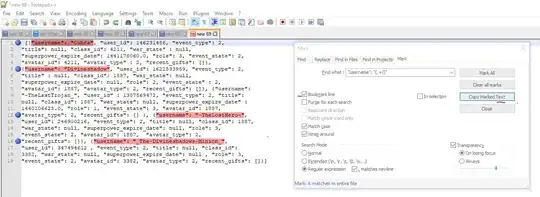
There is a way to achieve this using notepad++ Tool.

  1. Ctrl + F >> Find : "username": "(.+?)"
  2. Move to Mark tab >> Mark All
  3. Copy marked text

Done! :)

DarkDiamond
  • 1,875
  • 11
  • 12
  • 19
Sreejith
  • 11
  • 2
0

You can do this with an online JSON to CSV converter.

Just upload your JSON text and you will be able to download a CSV file.

  • That only formats it into CSV, it does not filter/query the json for specific fields. – DdW Oct 11 '19 at 09:37
0

Use Windows Powershell if on a PC:

$json = @"
 [{"username": "Cobra", "user_id": 146231486, "event_type": 2,
"title": null, "class_id": 4211, "war_state" : null,
"superpower_expire_date": 1441178060.0, "role": 3, "event_state": 2,
"avatar_id": 4211, "avatar_type" : 2, "recent_gifts": []},
{"username": "Divineshadow", "user_id": 1622533959, "event_type": 2,
"title" : null, "class_id": 1887, "war_state": null,
"superpower_expire_date": null, "role": 2, "event_state" : 2,
"avatar_id": 1887, "avatar_type": 2, "recent_gifts": []}, {"username":
"-TheLastTrojan_", "user_id" : 1387569472, "event_type": 2, "title":
null, "class_id": 1887, "war_state": null, "superpower_expire_date" :
1440106625.0, "role": 1, "event_state": 3, "avatar_id": 1887,
"avatar_type": 2, "recent_gifts": [] }, {"username": "-TheLostHero-",
"user_id": 246900216, "event_type": 2, "title": null, "class_id": 1887,
"war_state": null, "superpower_expire_date": null, "role": 3,
"event_state": 2, "avatar_id": 1887,  "avatar_type": 2,
"recent_gifts": []}, {"username": "_The-Divineshadows-Minion_",
"user_id": 347494612 , "event_type": 2, "title": null, "class_id":
3382, "war_state": null, "superpower_expire_date": null , "role": 3,
"event_state": 2, "avatar_id": 3382, "avatar_type": 2, "recent_gifts": []}]
"@

($json | ConvertFrom-JSON).GetEnumerator() | Select username

Should you want to convert to CSV:

($json | ConvertFrom-json).GetEnumerator() | Select username | ConvertTo-CSV -NoTypeInformation
Josh
  • 1
  • 1
    Your answer could be improved with additional supporting information. Please [edit] to add further details, such as citations or documentation, so that others can confirm that your answer is correct. You can find more information on how to write good answers [in the help center](/help/how-to-answer). – Community Apr 26 '22 at 16:43