0

Okay, so I have OS X 10.11 and Windows 8.1 partitioned on my computer, I installed windows using efi. I decided to add an additional partition to my computer, but windows decided that it didn't like that and now it isn't booting. I think the problem is that disk utility converted the disk to a hybrid-mbr disk when I partitioned it because whenever I boot into the windows installation efi, it says that windows efi can only be installed on GPT disk systems. How would I remove the hybrid-mbr data and use all three partitions as gpt disks (in windows point of view).

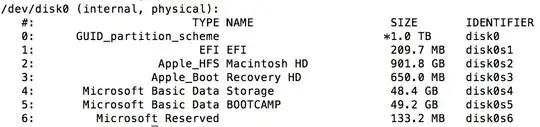
Current Disk Partitions:
user
  • 29,449
  • 11
  • 99
  • 144
JR Kibbey
  • 1
  • 2
  • 1
    It would be helpful to see what OS X's "gpt" and "fdisk" commands (both of them) say the partition tables look like. As verbose as possible. Sorry I'm on mobile right now and can't look up the exact command syntax for each command. – Spiff Oct 21 '15 at 04:37

2 Answers2

0

I found out my how to do it. 1) Download and installGDISK [Make sure rootless is turned off if your using El Capitan] 2) enter sudo disk /dev/disk0 (it is disk1 in case but replace that with whatever disk your trying to modify) 3) type x and hit enter 4) type w and hit enter 5) enter Y, because you want to make all partitions GPT 6) It works! (for me at least) I hope this helps anyone with this problem.

JR Kibbey
  • 1
  • 2
-1

my 10cents,

microsoft and apple do not use the same graphic boot and partitioning info plus microsoft is not 100% compliant with the graphic boot and partitioning recommendations.

secondly microsoft windows will only boot from an active primary partition plus the OS needs the right info to be able to boot the OS.

as that u changed the partitioning of your hard drive after windows was loaded, windows now do not recognize the partition where you have originally installed windows.

there are quite a few web sites explaining hard drive partitioning and booting info for all the different OS'ses and formatting pros and cons.

some of this info is quite complex so be warned, plus u need to get software to fix what u have done, some are freeware with limited functions and others u might need to buy the software to the be able to do the fixing.

the following site will give u some insight http://thestarman.pcministry.com/asm/mbr/index.html it is more referenced to mbr than efi style but one have to start some place

wishing u all the best in your learning curve in this interisting subject