5

I have an Intel laptop with Wi-Fi running Windows Vista, and connected to the Internet using the Huawei 3G key. Can I share this connection using Wi-Fi with another laptop/device?

I can't find an ad hoc Wi-Fi network option, maybe because I'm not using a wired connection.

Any solution?

happy_soil
  • 2,411
  • 2
  • 20
  • 22
CodeOverload
  • 459
  • 1
  • 10
  • 19
  • http://windows.microsoft.com/en-US/windows-vista/Ad-hoc-networking-How-the-network-with-the-funny-name-can-make-your-life-easier and http://www.home-network-help.com/ad-hoc-wireless.html – Rook Jan 21 '10 at 22:45
  • @Idigas , Thanks, but like i said, i DON'T have an Ad Hoc Wi-Fi Network option – CodeOverload Jan 21 '10 at 22:49
  • What? at all ? tried looking in your system hardware/properties on wireless card options ? If it doesn't show up even there, then I'm sorry to say, you're probably out of luck (like Molly already indicated). – Rook Jan 21 '10 at 22:56
  • All WiFi cards should support Ad-Hoc, which is what you need for Wil's answer. Only some cards support AccessPoint, which is what you need for Molly's answer. They are two different modes. – davr Jan 21 '10 at 23:06

4 Answers4

6

Yes you can.

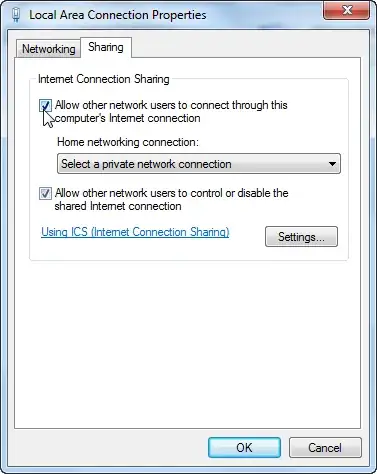
Go to Network and Sharing Center and click Manage network connections, Right click on the 3g connection and go to properties and on the advanced tab, choose Share This Connection and choose the wireless card.

enter image description here

Next, to set up the ad-hoc connection:

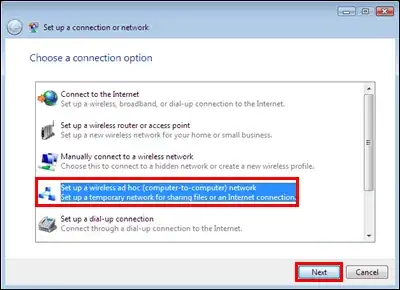
Simply go to Network and Sharing Center and click on Set up a connection or Network

alt text

Next, choose the Ad-Hoc option.

alt text

Follow the on screen instructions and on the other machine, you should now see the name of the network when you scan from the second machine.

It should all be working now.

Gaff
  • 18,569
  • 15
  • 57
  • 68
William Hilsum
  • 116,650
  • 19
  • 182
  • 266
  • thanks so much for the answer, i did all the first steps, but i don't have the "ad hoc" option when i go to setup a connection or network. any ideas? Thanks – CodeOverload Jan 21 '10 at 23:09
  • see my answer ... if the card doesn't support it, then this will not work. –  Jan 21 '10 at 23:10
  • @Unknown Is your wireless card turned on/power on to it? Also, you can try going to "Network and sharing center", then going to "Manage Wireless Networks" and click Add on the toolbar. Ad-Hoc should be an option somewhere along that... @Molly, Ad-hoc is pretty much part of the standard that most laptops for many years supports. It was stated that it can't be found, not that it doesn't exist. – William Hilsum Jan 21 '10 at 23:15
  • It's all guesswork, we don't know the make and model of the laptop or the WLAN adapter. Standard or not, there are quite a few adapters that do not support it. –  Jan 21 '10 at 23:18
  • @wil please see : http://imgur.com/PFsSB.jpg , and i have 2 network adapters in device manager : Broadcom Netlink (TM) Gigabit Ethernet -- And -- Intel(R) Wifi Link 5100 – CodeOverload Jan 21 '10 at 23:25
  • Can you go to device manager, expand network connections and take a screenshot there, I think that something else is wrong here... – William Hilsum Jan 21 '10 at 23:41
  • Hi, here is it : http://imgur.com/KdCTz.jpg – CodeOverload Jan 21 '10 at 23:47
0

You can use Connectify

Mayank
  • 2,158
  • 6
  • 22
  • 27
0

3G and Wi-Fi (as in "regular" wireless cards) are not the same thing. 3G is, I believe, a trade name for WiMAX standard. If you mean, sharing the connection via regular wireless cards while being connected to 3G, I guess it would be possible, but IMHO, unusable, since 3G are not exactly broadband connections.

Peter Mortensen
  • 12,090
  • 23
  • 70
  • 90
Rook
  • 23,617
  • 32
  • 128
  • 213
  • 1
    3G is what cell-phones use...unrelated to WiMax. 3G is in fact broadband speed, some networks actually support 7.2Mbit/sec connections (UMTS/HSPDA in particular...3G is a somewhat broad term that encompasses several technologies). – davr Jan 21 '10 at 23:04
  • Well, ... I just checked ... dug up one of those little pcmcia cards, and it says 3g and wimax on it... – Rook Jan 21 '10 at 23:26
  • Interesting, I didn't know they made cards that support both standards. But just because a card supports two different standards, doesn't make them the same thing. – davr Jan 23 '10 at 19:15
  • true ... my mistake there. – Rook Jan 23 '10 at 19:27
0

Make sure the WLAN controller is turned ON.

For most laptops you'll have to use a FN key combination to toggle wireless on/off.

alt text

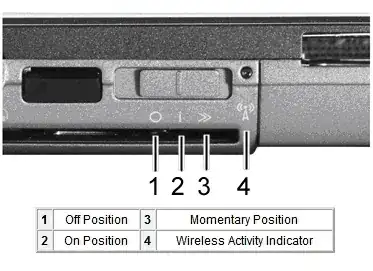
Some laptops have a physical switch:

alt text

In most cases WLAN ON is indicated by an LED.

Gaff
  • 18,569
  • 15
  • 57
  • 68
  • Hi, thanks, i don't understand what do you mean with the adapter ? the key? – CodeOverload Jan 21 '10 at 23:16
  • no, the WLAN controller of your laptop, can you open the device manager, expand 'Network adapters' and post the model of your wireless network controller? –  Jan 21 '10 at 23:19
  • Hi, there are two : Broadcom Netlink (TM) Gigabit Ethernet -- And -- Intel(R) Wifi Link 5100 , and also please see : http://imgur.com/PFsSB.jpg – CodeOverload Jan 21 '10 at 23:24