6

I've been a Mac user for about 1.5 years and so far enjoyed the experience. But one thing I miss from other operating systems is the lack of compression/decompression utilities that follow the "folder" analogy.

The things I was able to find only decompressed entire archives to a destination directory without even giving me the chance to see what's contained in the archive. I guess I am more used to something like winrar or the gnome archive utility so when I double click an archive file, I wan't to be able to see what's contained in it and be able to extract individual files.

Is there any hope (without resorting to command line), or maybe I should code one myself :)

  • I get annoyed on Windows because when I double click a zip file I expect it to extract everything into my current folder. Double clicking shows me the contents like a folder which is useless because I can't use the files without extracting them from the archive. Instead I have to right click to extract and then it puts up three dialog boxes that I never change to do this. – Mark Thalman Mar 04 '10 at 21:34

10 Answers10

4

try Zipeg

very nice app for inspecting/unarchiving archives - and it's free.

Kingi
  • 41
  • 1
4

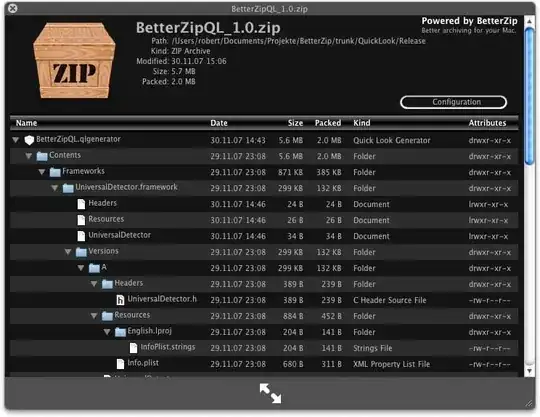
Maybe the BetterZip Quick Look Generator would work. It doesn't make it transparent like a folder, but it's fairly fast at displaying the contents of the archive.

BetterZip

Gaff
  • 18,569
  • 15
  • 57
  • 68
fideli
  • 14,636
  • 2
  • 35
  • 44
1

iArchiver provides a file-explorer type interface for archives. However, it does this when you drag the archive on to the "Extract" box in the program; just double-clicking archives in Finder will still auto-extract them.

phoebus
  • 3,921
  • 1
  • 18
  • 15
0

I've been using macPar DeLuxe as it handles par files and rar files. Feature light, but it works.

skarface
  • 1,108
  • 7
  • 20
0

For the sake of completeness (of a list of nice archivers) and just citing another similar question's answer, you can try Unarchiver (which I'm still to experiment myself).

I have same exact wish as the OP, and I just had a very bad experience with Springy, which was the best one I've tried so far.

cregox
  • 5,804
  • 7
  • 49
  • 66
  • 1
    Unarchiver just takes an archive and uncompress it. You can't view the contents before that... – maxxyme Aug 11 '21 at 15:16
  • fair enough @maxxyme but i think i did acknowledge that in the answer. in any case, this is 11 years old, and i don't use mac for at least 4. i still recommend trying 7-zip. cheers! – cregox Aug 14 '21 at 04:26
  • I like 7-zip too (using it on Windows for years - can't remember when I started by the way) ... but I'm still looking for something similar on Mac... – maxxyme Aug 16 '21 at 07:41
0

I'm probably late to the party, but I recommend Marta if you don't want to mess with system extensions

https://marta.sh/

  • Your answer could be improved with additional supporting information. Please [edit] to add further details, such as citations or documentation, so that others can confirm that your answer is correct. You can find more information on how to write good answers [in the help center](/help/how-to-answer). – Community Apr 19 '23 at 04:27
  • Please discuss its pros and cons – Rohit Gupta Apr 19 '23 at 04:28
0

UnrarX is very basic but it works, and it is free (open-source).

ccpizza
  • 7,456
  • 6
  • 54
  • 56
0

Springy can do this.

Springy is a simple to use, yet powerful archiving and compression utility for Mac OS X. Springy integrates seamlessly with the Finder and includes some very useful features. All archiving tasks can be done via Drag and Drop, system Services Menu or through Springy's Finder contextual menu.Springy features at a glance: Open and browse the contents of an archive or disk image without extracting any file from it. Quickly extract all files or only files of choice from an archive or disk image. Quickly extract the whole archive or disk image by double-clicking its file in a Finder.Modify the contents of an existing archive or disk image: add, overwrite, delete and rename files in an archive or disk image. Full Drag & Drop support for archiving and extracting from and into Finder.

alt text

The context menu:

alt text

Springy is shareware, try it before you buy it ($19.95 for a license).

Gaff
  • 18,569
  • 15
  • 57
  • 68
John T
  • 163,373
  • 27
  • 341
  • 348
0

RarLab provides a windows version which is called WinRar and one for Mac OS X just called RAR.

The download including a 40days trial can be found here: http://www.rarsoft.com/download.htm

road242
  • 648
  • 3
  • 10
  • 16
-1

"The Unarchiver"! is free and located in the Mac App Store. It can extract almost all archives.

Stephen Rauch
  • 3,091
  • 10
  • 23
  • 26
  • OP asked for a "Winrar-like archive utility", that would let him preview the contents of the archive BEFORE uncompressing it!!! – maxxyme Aug 11 '21 at 14:46