3

I have a router and wanna connect it to two pcs using ethernet cable.

I've seen similar question here and it had a good answer but the following pattern that they were talking about was surely not working:

Pattern

I'm asking what if I use some thing like this:
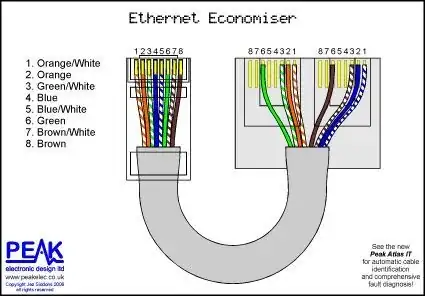
Ethernet Economiser

It looks there is no collision and both pcs can has a 2 paired internet connection but I don't know does router can handle it or not.

I know there are switches and hubs but don't mention them.

CaldeiraG
  • 2,536
  • 7
  • 18
  • 33
  • This will NOT work. – Akina Dec 10 '19 at 09:13
  • Yes it will work. – Mr Ethernet Dec 10 '19 at 09:13
  • 1
    @MrEthernet He must have 2 ports on the router which are joined into one cable and then are splitted back to PCs. But if a router have 2 LAN ports OP do not need in this trick - so he has 1-LAN router. In such case the task is unsolvable. – Akina Dec 10 '19 at 09:15
  • True. But if he has only a single drop going through a wall and doesn't want to run a second one, and doesn't mind only getting 100 Mbps, then this trick could potentially be useful. https://utcc.utoronto.ca/~cks/pics/office/ethernet-splitter.jpg – Mr Ethernet Dec 10 '19 at 09:17
  • *does router can handle it or not* None standard handles this scheme. – Akina Dec 10 '19 at 09:17
  • @akinawhy i must have 2 ports on my router? – raiden the reaper Dec 10 '19 at 09:17
  • Akina is right. Why can't you use a switch? A 5-port one is probably the same size as your router if that is your concern. – CaldeiraG Dec 10 '19 at 09:18
  • What is your router model? or at least how many LAN ports it has? – Akina Dec 10 '19 at 09:18
  • no right now i even dont have 2 pcs its just a question i dont wanna find a solution for problem just wanna see this one works or not? – raiden the reaper Dec 10 '19 at 09:19
  • TP-link-w8151N-wireless and a single ethernet port. – raiden the reaper Dec 10 '19 at 09:21
  • @raidenthereaper this could work but it would need *two* LAN ports on the router that converged into a single, custom Ethernet cable, which would then diverge at the other end to the two PCs. Only pins 1356 would be used in each RJ45 plug. – Mr Ethernet Dec 10 '19 at 09:21
  • @MrEthernet it's indeed a single LAN port because it's a ADSL router. Rare these days – CaldeiraG Dec 10 '19 at 09:23
  • @CaldeiraG Very rare! Well I guess he's SOL. Too bad: https://c1.neweggimages.com/ProductImage/33-704-171CVF-05.jpg – Mr Ethernet Dec 10 '19 at 09:24
  • *TP-link-w8151N-wireless and a single ethernet port.* There is 3 variants to connect 2 PCs. Var.1 - use additional switch. Var.2 - connect 2nd PC via 1st one which must have 2 NICs and share the connection. Var.3 - use wireless NIC on one or both PCs. Except to buy another router model, of course... – Akina Dec 10 '19 at 09:24
  • @Akina if he wants to stick with Ethernet and avoid WiFi, I think the switch makes the most sense. If he uses PC1 as a proxy server to share the Internet with PC2, PC2 will lose its network connection every time PC1 is turned off. That setup would be more complicated and less reliable. That's actually how I had my first home network set up, also with an ADSL modem in the 90's and it was awful! – Mr Ethernet Dec 10 '19 at 09:28
  • @mrEthernet thanks for answer u mean using splitter in picture finally dosent wroks?u sayd about speed so i know it will be low caus of using 2 paired connection but i wanna know router will understand that there are 2 clients behind port or not. – raiden the reaper Dec 10 '19 at 09:29
  • @MrEthernet Agreed in general. But I should to buy a router with 4 LAN ports instead - such SOHO device price is low enough. – Akina Dec 10 '19 at 09:31
  • 1
    @raidenthereaper your router will not understand that there is a custom Ethernet cable connected to it. You must "split" the single Ethernet cable by using a small switch like this first: https://images-na.ssl-images-amazon.com/images/I/712W1xeY2GL._SL1500_.jpg – Mr Ethernet Dec 10 '19 at 09:32

1 Answers1

1

Your router only has one LAN port and would not understand that there is a custom Ethernet cable connected to it:

enter image description here

You must first "split" the single Ethernet cable coming from your router by using a small switch like this:

enter image description here

You could then use a custom Ethernet cable like this, with both jacks at one end connected to two different LAN ports at the switch:

enter image description here

Mr Ethernet
  • 4,191
  • 2
  • 16
  • 28