73

When clicking the X button or ALT+F4, how can I get Outlook to minimze to the tray instead of close?

Several programs have this behavior, and it's annoying that Outlook behaves different...

wonea
  • 1,817
  • 1
  • 23
  • 42
Tamara Wijsman
  • 57,083
  • 27
  • 185
  • 256
  • I'm taking this issue to the next level here: http://stackoverflow.com/questions/3947038/how-can-i-override-the-close-button-to-minimize-instead-for-a-specific-applicatio – Tamara Wijsman Oct 16 '10 at 00:38
  • Still haven't developed that hook yet, perhaps I could look into writing an Outlook add-in as another option. Other solutions are still welcome though, I seem to become used to minimizing but still closing it instead with hot-keys would take less effort (unless I create one for minimizing)... :) – Tamara Wijsman May 05 '11 at 07:13
  • Tom, please see http://meta.superuser.com/questions/6723 – Karan May 02 '13 at 15:17

9 Answers9

76

I wrote a free plugin to minimize outlook instead of closing it. I only have outlook 2007 (works on 2010/2013 version as well) so that is all it has been tested with.

Anyone who wants to contribute to the project is free to do so

https://sourceforge.net/projects/keepoutlook/

Installation

  1. Install Microsoft Visual C++ 2010 SP1 Redistributable Package 32-bit and 64-bit (both required for x64 Windows)
  2. Download KeepOutlookRunning.dll
  3. Start Outlook as Administrator (right click on it in Start Menu)
  4. Go to File -> Options -> Add-Ins
  5. At the bottom: Manage [COM-Addins] press [Go...]
  6. [Add...] the KeepOutlookRunning.dll file downloaded in step 2
  7. Restart Outlook as a normal user
Tim Eck
  • 769
  • 5
  • 2
  • 6
    [Doesn't work for me on Outlook 2010](http://content.screencast.com/users/TomWij/folders/Jing/media/f9d0ef58-3bf1-4691-ab69-a942d573dd9d/2011-05-05_0911.png). :( – Tamara Wijsman May 05 '11 at 07:11
  • 2
    It worked for me though. Win7 SP1 32 bit + Outlook 2010 32 bit. Also I have checked "Hide When Minimized" options in tray icon. – Anindya Chatterjee Jan 04 '12 at 20:54
  • 2
    @TomWijsman, If I install the 32bit Visual C++ 2010 SP1 Redistributable package I don't get that error but it just returns to the dialog without adding it. I'm running 64bit. – Sam Hasler Jun 26 '12 at 16:21
  • 1
    Does work for me on Outlook 2010 ran on Windows 7 64-bit SP1. Wonderful job! – MasterMastic Apr 19 '13 at 16:36
  • keep outlook plugin worked for me on 64 bit machine, 32 bit outlook 2010. I had to run outlook as administrator to get the add-on to install. – Joe Jun 01 '11 at 21:29
  • Worked for me on Outlook 2013 (32-bit) [Running on Windows 7 (64-bit)]! – BrainSlugs83 May 26 '13 at 22:49
  • @SamHasler make sure the add-in didn't get added to your list of disabled add-ins (instead of "COM Add-ins" select "Disabled Items") . If that doesn't work try looking up the "VSTO_SUPPRESSDISPLAYALERTS" environment variable debugging stuff, maybe some more information will help the author. – BrainSlugs83 May 26 '13 at 22:54
  • Windows 7 -> start -> shift + right click on outlook 2010 -> run as administrator -> apply steps in answer -> choose 32 bit version of dll (KeepOutlookRunning.dll) -> voila! it works like a charm! – Teoman shipahi Oct 15 '14 at 20:25
  • 1
    Worked for me Outlook2013 x64 – Didar_Uranov Jan 27 '15 at 10:31
  • Worked form me on Win8-64-2013 – Handsome Nerd Feb 05 '15 at 15:20
  • Pure money on this addin. Outlook 2013 x32. – WernerCD Feb 18 '15 at 17:36
  • Dammit... why can't I +1 this again? – WernerCD Sep 04 '15 at 18:22
  • 6
    I know this is old, but it still works for Outlook 2016 x32 (Windows 10 Pro x64) and it also works for Outlook 2016 x64. Just make sure to use the 64-bit version of this add-in. – jgawrych Feb 14 '16 at 23:57
  • 4
    Still works on Outlook 365. Let's hope MS builds this into Outlook before breaking the legacy add-in API. – The SE I loved is dead Oct 02 '19 at 03:38
  • @TamaraWijsman I have the same issue. Did you find a solution? – Vladimir Markiev Jan 29 '21 at 08:45
  • I am using 365 and when I add it following the instructions, nothing happens. After I select the file in the explorer, it doesn't get added to any list – Jeffmagma Sep 23 '21 at 21:46
  • 1
    Works with Outlook 2019. Thanks!! – Didar_Uranov Oct 21 '21 at 11:32
  • 1
    Cry. Outlook 365, 2022: "KeepOutlookRunning.dll is not a valid Office Add-in." – dbreaux Mar 11 '22 at 14:26
  • I don't have admin privileges on my work computer, and did not think it was worth all the explaining just to ask IT to get on my computer for this little add in, so I managed to make it installable without doing it through Outlook and without needing admin rights. See my release here: https://github.com/theduffster/KeepOutlookRunning/releases/tag/zip-release – I'm_With_Stupid Nov 04 '22 at 19:04
  • Still working with Office/Outlook 2021! – hexaae Jun 30 '23 at 00:41
12

With "Hide when minimized" active (not hard to find, just right click on the "O" icon in the tray)

  1. Open outlook

  2. Minimize outlook

  3. Open outlook again (not from the tray, just do it the way you did it in step 1)

You can close that window with alt+f4 or the X or whatever and outlook will still be in the tray.

svick
  • 927
  • 1
  • 8
  • 26
user102347
  • 185
  • 1
  • 3
  • 5
    That does not mean "Hide when closed". Thus step 2 is invalid and your last sentence is false... – Tamara Wijsman Oct 21 '11 at 00:31
  • 2
    Well, @Tom, after all these steps, it WILL be hidden on close. This solution works well for me, it is exactly what I wanted. – Dmytro Shevchenko Jun 21 '12 at 12:55
  • 8
    @Shedal: This clearly reads **hide when minimized** and does not work when **closing** it. – Tamara Wijsman Jun 21 '12 at 22:00
  • @TomWijsman, have you tried it? As I said, it works for me. After performing the three above steps, when I **close** the window with the **X**, the window becomes minimized and hidden. I can still open it from the tray, since it's not actually closed. I believe that's what you want. – Dmytro Shevchenko Jun 22 '12 at 00:38
  • 10
    @Shedal This doesn't really allow Outlook to close to the tray, just keeps an extra copy running in the background. Hence, not really what the OP was after. – Hannele Jul 30 '12 at 15:30
  • @Hannele I agree with Tom. That option string may not be very intuitive, but it works for me when I try to prevent Outlook from closing by accident. – aitorpazos Aug 08 '13 at 12:16
  • 1
    I prefer this one rather than installing any extra addins – Nam G VU Aug 15 '13 at 05:20
  • This and pinning Outlook to Taskbar solved all my issues. Thanks. – Monir Sep 12 '14 at 14:39
  • This does NOT work at least with Windows 10 + Outlook 2022. If I minimize Outlook it goes to the tray/notification area (next to the clock), but if I open it again and then close it (with ALF+F4 or by clicking the X button) it just closes the process. – Wizard79 Feb 28 '23 at 15:08
6

Hit ALT+Spacebar+N. I do that every day, and it is an easy combination.

This can work with, or without, the "Hide When Minimized" option selected.

KCotreau
  • 25,519
  • 5
  • 48
  • 72
  • Interesting, I will probably map this under an easier to press combination. Perhaps ALT+F2 for minimize and ALT+F3 for maximize... – Tamara Wijsman Jun 15 '11 at 23:15
  • 4
    Or `Windows Key + Down Arrow` under Windows 7. If it is Maximized, this will first Normalize it, second press Minimizes it. I keep my window Normalized but stretched right to the edges. – Nigel Touch Jul 05 '13 at 18:30
2

You'll have to use a third party tool like OLKeeper
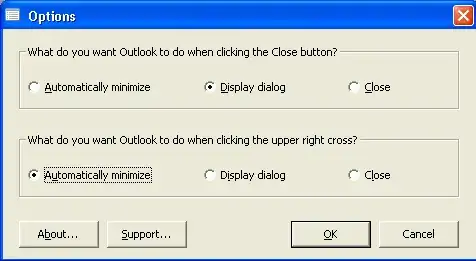
alt text

Sathyajith Bhat
  • 61,504
  • 38
  • 179
  • 264
2

You may use Minime at http://www.saphua.com/minime/minime.aspx. It's free & open source.

Nam G VU
  • 12,146
  • 60
  • 135
  • 209
1

I didn't have administrator access on my work computer, so I needed to create a way to install Tim Eck's add-in without administrator privileges.

I took Tim Eck's answer here and created an installer for it that:

  1. Does not require administrator privileges
  2. Installs it in Outlook without having to use Outlook to install it

You can download it here: https://github.com/theduffster/KeepOutlookRunning/releases/tag/zip-release

Instructions to Install are:

  1. Extract contents of "KeepOutlookRunning.zip" anywhere
  2. CD to folder containing the contents you just extracted
  3. Run InstallKeepOutlookRunning.bat if you are running a 32 bit version of Outlook. Run InstallKeepOutlookRunning-64bit.bat if you are running a 64 bit version of Outlook
  4. Restart Outlook

Note: You may have to change some of the paths in the .reg file depending on your version of outlook

Hopefully this will also help those who are having trouble installing Eck's add-in even with administrator privileges

Full Credits and more Details here: https://github.com/theduffster/KeepOutlookRunning

I'm_With_Stupid
  • 203
  • 1
  • 2
  • 8
1

Another two week trial add-in that does that (and more) is Quick Tweaks for Outlook. Just set the Minimize Outlook on close option. It is small and doesn't require any additional software/runtimes.

Please note that I recommend this add-in because I'm one of its developers.

Overmind
  • 9,924
  • 4
  • 25
  • 38
thims
  • 9,127
  • 26
  • 36
0

I totally free and reliable option is the Autohotkey.

Here there script that also restores outlook when #o is pressed. First, you have to set the option in outlook setting to minimize on tray.

#IfWinActive, ahk_exe olk.exe
^F4::
WinMinimize, A
return
!F4::
WinMinimize, A
return
#IfWinActive
#If WinExist("ahk_exe olk.exe")
#o::
WinActivate, ahk_exe olk.exe
WinMaximize, ahk_exe olk.exe
return
#If
0

If the Alt + spacebar + N doesn't work for your keyboard layout (turned out not to work with mine - Polish Programmer), try:

Alt + spacebar + M