3

Possible Duplicate:
How to make Outlook 2010 minimize when I try to close it?

I want to "disable" the ability to close Outlook2010. I always "close" it instead of minimizing it.

What are some good light-weight solutions to keeping Outlook open, re-opening it auto-magically, disabling the X in that particular application.

edit: I'd prefer not spending money on a situation that I know is relatively simple, yet uncovered in the tons of options in Outlook.

WernerCD
  • 4,313
  • 6
  • 32
  • 43
  • This showed up as the first result when searching from Google - I'd just like to point out that there's a free utility as answer to the other question (although, perhaps not for Outlook 2010): http://superuser.com/a/275244/94821 – Hannele Jul 30 '12 at 15:15

2 Answers2

3

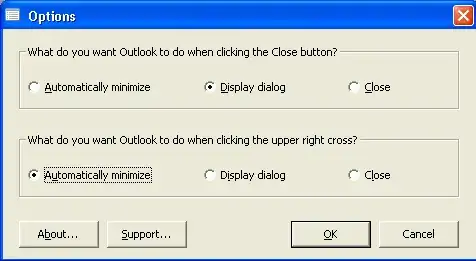
Have a look at OLKeeper

alt text

Sathyajith Bhat
  • 61,504
  • 38
  • 179
  • 264
3

Edit years later:

Using KeepOutlookRunning mentioned in the duplicate question: https://superuser.com/a/275244/49695

Original:

Finally figured out a working solution that doesn't involve installing something I have to pay for... I've been trying to figure this one out for weeks before I really put too much time into it today:

Powershell script:

# Start outlook if not running
Clear-Host

if (Get-Process "OUTLOOK") 
{

}
else 
{ 
    Invoke-Item "C:\Program Files\Microsoft Office\Office14\OUTLOOK.EXE" 
}

Setup a task scheduler that runs every 5 minutes. If outlook is found, empty part is run... else, Invoke-Item runs Outlook.

To enable running of Powershell Scripts... Enable running of locally created scripts (foreign scripts must be signed by a trusted source):

run Powershell as administrator  
Set-ExecutionPolicy RemoteSigned  

Bam. I know I'm not the one with this problem... and don't wish to spend $60 on a solution for something so simple. I'm not cheap, but I'd rather spend that money on my girlfriend :)

WernerCD
  • 4,313
  • 6
  • 32
  • 43
  • Cool, sounds good. – Sathyajith Bhat Oct 15 '10 at 20:42
  • 1
    +1 because it would be a potential solution but it has its downsides: Loads Outlook again in the background (could hurt gaming performance); Sent/Receive would happen more or less than it should be happening; when you need Outlook again within the 5 minutes it won't be there. I'm taking this issue to the next level here: http://stackoverflow.com/questions/3947038/how-can-i-override-the-close-button-to-minimize-instead-for-a-specific-applicatio – Tamara Wijsman Oct 16 '10 at 00:23
  • Yeah... it doesn't seem like a perfect solution, but I don't really do anything yet that requires a finer granularity than 5 minutes. Not worried about gaming (work computer). Outlook shouldn't load twice (Idea is it won't run Outlook.exe if its already loaded) – WernerCD Oct 16 '10 at 16:03