I find strange that my Windows 7 continues playing music it is locked. I would like that it be mute in that state, or at least that it stops/pauses the music player. How to configure it? I use foobar2000 as my music player
Asked
Active
Viewed 1,148 times
4


-
Locked is not the same as sleeping. Lock prevents external user input - it doesn't stop processes from running. Are you sure you don't really want to put your computer to sleep? – PP. Oct 04 '10 at 13:54
-
locked != locked up – Dennis Williamson Oct 04 '10 at 15:11
-
@Dennis corrected – Jader Dias Oct 04 '10 at 16:03
-
@PP good idea, maybe it is what I need – Jader Dias Oct 04 '10 at 16:04
2 Answers
5
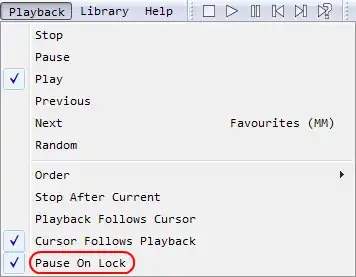
Since you are using foobar2000 you can use this foobar plugin
Adds the menu command "Pause On Lock" which will automatically pause playback when the desktop is locked or when a Fast User Switch occurs, then resume when the desktop session is restored.

nixda
- 26,823
- 17
- 108
- 156
2
You could use Mute On Lock:
Mute On Lock is a tiny resident utility that sits in the system tray and monitors your session: when you are locking your Windows workstation, it mutes the sound of your speakers. With the help of this program you can quickly mute or unmute the system sound by double-clicking the tray icon or using an optional hot key.

It's free and run from Windows XP to Windows 7 (including 64-bit editions).

Snark
- 32,299
- 7
- 87
- 97
-
1
-
1Did you try to use the 'Windows Compatibility mode' set to Windows XP? – Xavier Nodet Oct 05 '10 at 08:48