3

Sometime over the past year Google Chrome introduced a feature that detects when you use it in a new country and asks something like "Your location has changed. Do you want to set the language to XXX?"

When I was in Korea I thought it might be fun to play with so I said yes. Problem is it didn't seem to offer a way to go back to my previous setting. Since then I've changed countries a few times and sometimes said yes again to this prompt since one foreign language isn't much better for me than another. It's currently Romanian.

There are a few fixes out on various help sites but they all seem to deal with different problems and date to a time before this feature was introduced.

So how do I turn off this new location-detection languge-change-prompting feature, or how to I set it back to English without travelling to an English speaking country?

(I currently have Chrome 14.0.803.0 dev-m running on Windows 7 Starter)

hippietrail
  • 4,505
  • 15
  • 53
  • 86

2 Answers2

5

If you go to http://google.com/ncr it bypasses all language and location settings. You should be able to access your account to change the settings back to your original language and location.

You can also try this:

  1. On the upper right corner of Google Chrome, click on: Wrench > Basics > Manage search engines > Default search options

  2. Click on the Google search engine listed, making sure that it is not the default. If it is the default, select a different search engine from the list below and make it default, then make changes and switch the default back.

  3. Click on the rightmost field to change the Google search engine URL

  4. Replace google default url with http://www.google.com/search?{google:RLZ}{google:acceptedSuggestion}{google:originalQueryForSuggestion}sourceid=chrome&ie={inputEncoding}&q=%s

  5. If you cannot edit the URL field, delete the Google entry entirely and create a new one using this URL.

  6. Save settings.

  7. Test it

It worked for me in the UAE.

Sathyajith Bhat
  • 61,504
  • 38
  • 179
  • 264
zenbike
  • 380
  • 2
  • 3
  • 11
  • Yes but I'm talking about the searches that happen automatically by me typing into the omnibar or whatever it's called. And I've tried changing both the Google settings and the Chrome settings to no avail. I'll add this info to my question as soon as I can. I have to run now. – hippietrail Jul 04 '11 at 17:37
  • Hmm even with Google made not default it only lets me copy from the URL field and not paste or type to it \-: – hippietrail Jul 04 '11 at 19:55
  • OK I had to totally delete my Google entry and create a new one. I consider this a workaround and a real fix would be finding where the hell Google hid the setting to turn it off in Chrome! You'll still get the cookie though thanks (-: – hippietrail Jul 04 '11 at 20:03
  • 1
    No problem. I would consider it a work around to, but I got it from a friend who is a Chrome dev for Google. He said there is no off switch. Foolish, but (apparently) true. – zenbike Jul 05 '11 at 05:17
  • Cool. Thanks. And I'll be sure to check out what the differences were. :) – zenbike Jul 05 '11 at 07:57
0

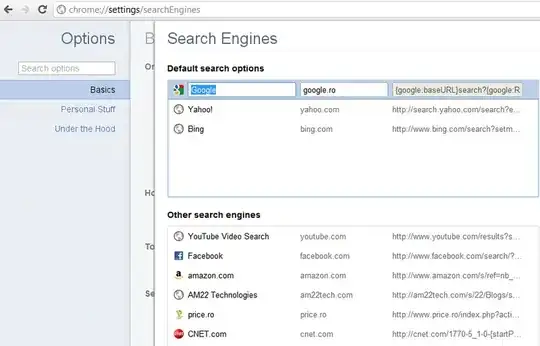
Click on the wrench icon and select Options. Under Basics click on the Manage Search Engines and change google.ro with google.com

enter image description here

Nicu Zecheru
  • 5,492
  • 7
  • 33
  • 46
  • 1
    Nicu, this works, but you must also change the URL, and set it as default. – zenbike Jul 04 '11 at 18:00
  • I tried this earlier. I changed it from `google.ro` to `google.com.au` also I cannot paste into the URL field with my version of Chrome. – hippietrail Jul 04 '11 at 19:57