33

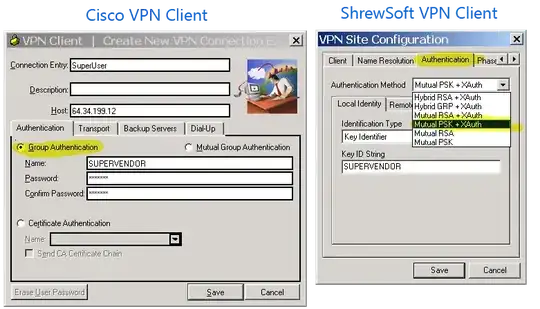
What are the steps to connect to a Cisco VPN server using the ShrewSoft VPN Client?

It's important to note that there are different kinds of Cisco VPN connections:

  1. Cisco VPN with pre-shared key (IPSec)
  2. Cisco AnyConnect (SSL VPN)
  3. Cisco VPN with a .pcf file (IPSec)
  4. Cisco VPN with certificate (IPSec)

I have the detailed answer for 1., pre-shared key. i will be answering that myself.

I need a detailed answer for using ShrewSoft VPN as an alternative to Cisco AnyConnect.

I know the .pcf is easy; you can read about it.

For completeness the certificate version would be good.

Hennes
  • 64,768
  • 7
  • 111
  • 168
Ian Boyd
  • 21,642
  • 49
  • 139
  • 184

1 Answers1

61

1. Cisco VPN with pre-shared key

Assume you have been given connection information for a Cisco VPN server:

Host: 64.34.199.12

Group ID: SUPERVENDOR
Password: *318#($@

User ID: ian@superuser.com
Password: ianvendor1234

These are the steps to use ShrewSoft VPN to connect to the Cisco VPN server, rather than the Cisco client:

  1. Create a new connection, and under Host name or IP Address enter the Host address (64.34.199.12):
    enter image description here

  2. On the Authentication tab, select Authentication Method of Mutual PSK + XAuth:
    enter image description here

  3. On the Authentication -> Local Authentication tab select Identification Type of Key Identifier:
    enter image description here

  4. Still on the Authentication -> Local Authentication tab, enter Key ID String of SUPERVENDOR:
    enter image description here

  5. On the Authentication -> Credentials tab, enter your Pre Shared Key of *318#($@:
    enter image description here

  6. Save the newly created connection, and click Connect

  7. When prompted for a username and password, enter your supplied User ID and Password, and click Connect:
    enter image description here

Ian Boyd
  • 21,642
  • 49
  • 139
  • 184
  • What you mean by group id is it group name? – alsadk Jun 05 '13 at 14:49
  • 4
    @alsadk Sure, why not. i'm not the one who decides Cisco's terminology; i'm just the one that wants them dead. – Ian Boyd Jun 05 '13 at 14:57
  • thanks for answer. I have a problem where the VPN connection is brought up, it looks like I can send data but nothing being routed back. anything that needs to be done windows (firewall) wise? (windows 8.1 x64) thanks- sam – sambomartin May 19 '14 at 15:40
  • Just a note for others -- in my company's setup there is an RSA soft-token. Upon initial setup the soft token's pin needed to be reset. The cisco version brought up the reset, the shrewsoft vpn failed with a non descript message. Once I reset the pin from default, shrewsoft works fine. – EBarr May 05 '15 at 00:12
  • 1
    We upgraded a few devices to Win10 and noticed that we couldn't use the old school cisco VPN anymore. I can verify that this method works 100%. Thanks a lot for providing this info. – lobi Sep 17 '15 at 16:09