2

I need to prevent clients of an Huawei E586 UMTS to WiFi modem from downloading much data from specific servers eg. Windows update or OSX update.

On the config page of the device there's an "LAN IP Filter" which seems pretty good but I can't figure out the right settings. The mask looks like this:
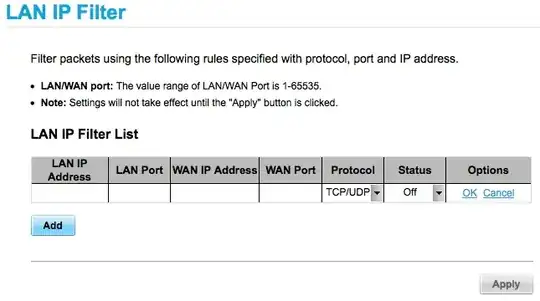
Mask of LAN IP Filter

The help pages states the following:

help page

My problem with this is, I want some wildcard for the local ip and port. In my opinion the help page can not be correct by "lan port: enter 80" because the source port is normally dynamic. I tried to set it up like stated there but as expected it doesn't work.

As wildcards I tried * and "ALL" but nothing worked as it prevents me from saving settings with an "wrong value" error.

fixer1234
  • 27,064
  • 61
  • 75
  • 116
Mose
  • 573
  • 2
  • 4
  • 15
  • I found port range can be defined with a simple hyphen… a bit untypical imho. IP range is still unclear – Mose Feb 03 '12 at 21:42

2 Answers2

-1

To find your LAN IP range, you'll have to look in the LAN settings section of the modem's management interface (it's probably a Class C 10.x.x.x or 192.x.x.x network).

So you could block all of your clients from Windows Update like this:

192-     80     65.55.184.155     80
goblinbox
  • 2,432
  • 14
  • 17
  • Using 192- fails by error "invalid ip". My problem isn't finding my IP! It's that the GUI seems to not accept wildcards or ranges on IP. I think that's clearly stated in my question? – Mose May 19 '12 at 18:32
  • Mose: Please don't downvote answers you don't like. Your question clearly states you want to stop users from downloading from "Windows update or OSX update." – goblinbox Apr 20 '13 at 22:26
  • It's not that I don't like your answer, it's because it does not work! It is not possible to put 192- into the IP field. – Mose Apr 20 '13 at 22:40
  • According to the screenshot you posted my answer should work, so your router's firmware is apparently buggy and/or broken. Contact the manufacturer for support or block outgoing traffic some other way. – goblinbox Apr 20 '13 at 22:50
-1

Try the entire subnet by typing 192.168.0.0 and if there's an option for a mask type in 255.255.255.0

That would then block the ports 192.168.0.1 to 254

Dave
  • 25,297
  • 10
  • 57
  • 69
Echo
  • 1
  • as you see in the picture, there is no way adding a subnet and also entering a network ip is invalid – Mose Aug 22 '12 at 10:36