75

I have 4 HDDs here with me, from 3 different manufacturers, and all of them have the following 4-pin extra interface beside the SATA connector:

HDD with 4-pin interface
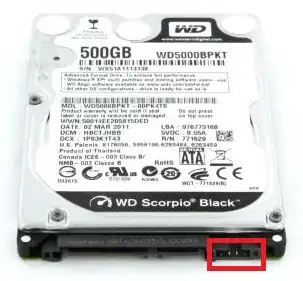
HDD with 4-pin interface

Looking on the internet, I can see that it exists on all HDD devices, but not on SSDs:

SSD without 4-pin interface
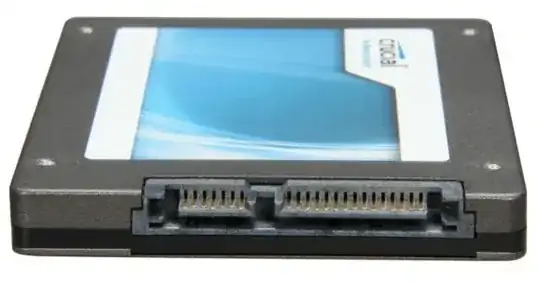
SSD without 4-pin interface

On old IDE devices, there was a similar interface used to select operational mode (master/slave), but on SATA it doesn't make sense anymore.

Could someone tell me what this interface is intended to do and why it doesn't exist on SSDs? It is used in any practical situations?

Rohit Gupta
  • 2,721
  • 18
  • 27
  • 35
Diogo
  • 30,192
  • 65
  • 150
  • 222

3 Answers3

81

Those are jumper settings, similar to the IDE drives you mention, but for SATA specific options depending on the drive maker. For example, on this Western Digital support page for mobile drives, it shows two options:

enter image description here

Also, it doesn't exists on SSDs because there is no spinup or spread spectrum related to solid-state devices.

@Adrian Cox mentions in the comments below, a different pin function for Seagate drives.

jdh
  • 7,023
  • 17
  • 22
  • 22
    *> RPS: Used by external hard disks to reduce spinup current and allows it to work over USB interface.*   I am going to punch you! Why didn't you post this a couple of months ago, *before* I rigged a SATA drive with a DIY-external-drive setup (eBay cable and power adapter)? Maybe then it would not have (literally) burned out the PCB. `:-(` +1 for both answering the question and enlightening me on about RPS. – Synetech Jun 26 '12 at 19:18
  • 2
    Why would you ever *not* want reduced power spin up though? – KayEss Jun 27 '12 at 00:12
  • 5
    Presumably its lower performance than the full power spin up. I wouldn't be surprised if the drive ran at a slower RPM as well. – Journeyman Geek Jun 27 '12 at 00:20
  • @KayEss fast boot time – ratchet freak Jun 27 '12 at 00:29
  • 1
    @ratchetfreak actually reducing power spinup will increase boot time in something like 0,5s.... – Diogo Jun 27 '12 at 02:10
  • 3
    @kayEss As USB ports are designed to work with 500mA max, if you start a HDD with 1A it will burn... – Diogo Jun 27 '12 at 02:10
  • 16
    You should probably emphasise that the jumpers are manufacturer specific. For instance, Seagate have the same four pin connector, but with a different function: http://knowledge.seagate.com/articles/en_US/FAQ/193991en – Adrian Cox Jun 27 '12 at 07:55
  • @Diogo For some people, racing matters. And even if you want to say that the amount of time is negligible, the amount of power difference might also be small. So the trade-off may be worthwhile. Another possibility is that a slower spin-up means it takes longer to get to operational speed, causing more wear and tear before the device is really becomes useful. – TOOGAM Mar 03 '16 at 04:49
  • 1
    @Diogo - I sincerely hope that the majority of modern PC's have current limiting on their USB ports, so by not reducing spinup speed, ergo initial current draw, the effect should simply be that the HDD appears to be dead to the naked eye upon trying to spinup. As an aside for all, this is why many external cables/enclosures have a cable that breaks out to 2 USB A plugs, to draw 500mA per USB port, to allow up to 1A draw. – user66001 Jul 20 '16 at 16:10
  • Oh god, I thouught my SSD was incompatible, because of those extra pins, but those are just jumper pins, thankfully – Post Self Aug 21 '18 at 18:09
  • 4
    Seagate moved their page from @AdrianCox answer. wayback has it though https://web.archive.org/web/20160608230214/http://knowledge.seagate.com/articles/en_US/FAQ/193991en – dgrogan Jul 21 '19 at 20:15
5

According to what i can find its a Manufacture specific firmware terminal that aids in HDD recovery. PC USB Terminal adapter There's a few images on this particular page that shows how to connect a USB cable to those ports using Manufacture specific adapters.

Drew Malone
  • 51
  • 1
  • 3
-1

That's a temperature port compatible for imac

Suparno
  • 23
  • 1