How can I combine two fonts automatically, so glyphs those are not available in the first font, but available in second one can be merged into the first font?
Asked
Active
Viewed 9.3k times

3 Answers
60
This is an easy task with fontforge.
Addendum from comments: Before merging, click Element > Font info... in both fonts first to see whether the values like em size match. Otherwise, update either to match the values of the other font. This prevents issues like different character sizes. This info should probably be added to the answer. – Cristan
First, you want to open the font with the missing glyphs and select Element -> Merge Fonts. In this example, the glyphs for E and F are the ones missing.

Select the font from which you want to pull glyphs. You will be asked whether you want to keep the existing kerning; you most likely want to select No here, but if you get strange results close fontforge and try again with Yes.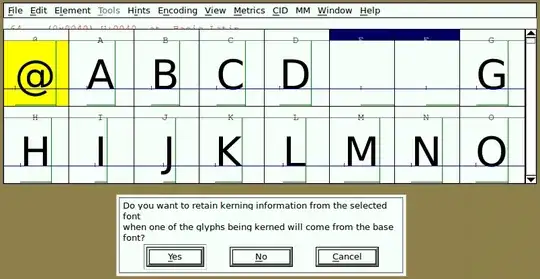
The missing glyphs should be added in a few moments: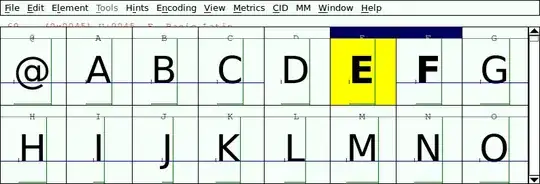
Finally, do File -> Generate Fonts and export your font to a desired location.

dset0x
- 2,215
- 15
- 13
-
I have hundreds of ttf files to merge. Is there a command-line for that? – user2284570 Oct 22 '14 at 20:26
-
https://gist.github.com/iegik/47b61b41d3c2a1f3fbb4#file-sfddiff-sh – iegik Feb 11 '15 at 10:52
-
3This seems to only work if the fonts are of a similar em height, otherwise the glyphs get all funky. – Hanna Dec 12 '17 at 00:39
-
Is there a way to do this for specific glyphs only? – Khalid Hussain Oct 05 '18 at 18:53
-
FontForge has python based [scripting](http://fontforge.github.io/en-US/tutorials/scripting/) to automate many tasks. But I would have been nice to see a more detailed and updated answer. – not2qubit Dec 09 '18 at 19:23
-
1Could you explain why we would most likely not want to preserve kerning? I – Maarten Jun 10 '19 at 11:03
-
1@Maarten I probably figured that one out by trial-and-error, but no, I can't really. It's been 7 years! – dset0x Jun 10 '19 at 16:39
-
1I merged missing font and it looks normal in Fontforge but it made the fonts microscopic at a normal font size. Is there an explanation? I thought Kerning is spacing, no horizontal height. – Jon Weinraub Jun 10 '19 at 20:33
-
5Before merging, click Element > Font info... in both fonts first to see whether the values like em size match. Otherwise, update either to match the values of the other font. This prevents issues like different character sizes. This info should probably be added to the answer. – Cristan Nov 20 '19 at 13:35
-
Thanks @Cristan. Added in the answer. I sure had a yucky-colored wallpaper in 2012. – dset0x Nov 28 '19 at 18:28
-
@Hanna you might also be interested in Cristan's comment. – dset0x Nov 28 '19 at 18:28
-
This did not work with Apple Color Emoji. – HappyFace Mar 14 '21 at 18:26
11
Also have a look at Google's Google Noto Font project and their Noto Tools merge_fonts.py script.
Or merge.py from the FontTools project.
For more deep info on making/adding fonts to Windows, look at my other answer here.

not2qubit
- 1,993
- 4
- 28
- 35
9
- Install FontForge
- It usually gets installed at
C:\Program Files (x86)\FontForgeBuilds\bin, so add that to your path environmental variable(Only for Windows Users). - Paste the below code in a file named
mergefonts.ff
#!/usr/local/bin/fontforge
Open($1)
SelectAll()
ScaleToEm(Strtol($3))
Generate("1.ttf")
Close()
Open($2)
SelectAll()
ScaleToEm(Strtol($3))
Generate("2.ttf")
Close()
Open("1.ttf")
MergeFonts("2.ttf")
Generate($4)
Close()
- mergefonts.ff Script Usage:
fontforge -lang=ff -script mergefonts.ff <font1> <font2> <font_size_in_em> <output_merged_font>
Example:
fontforge -lang=ff -script mergefonts.ff font1.ttf font2.ttf 1000 mergedfont.ttf

Fawaz Ahmed
- 111
- 1
- 2
-
-
-
Tested, works. Thank you. Ubuntu has Font Forge already installed so it's very easy. If someone is enthusiastic and fluent in bash it could be interesting to make it work for n font files. But it already works as of now. – Hugolpz Mar 20 '21 at 13:44
-
`__import__('subprocess').getoutput([r'C:\Program Files (x86)\FontForgeBuilds\bin\fontforge.exe', "-lang", "ff" , '-script' , r'scriptpath', r"font1path", r"font2path", '2048', r'newfontpath'])` – tejasvi88 Sep 02 '21 at 15:29
-
This seems to work good. However the order in which the fonts are merged seems important. Also the metadata from the first font (font-family, copyright, etc) is inherited strictly from the first font. – Llama D'Attore Aug 15 '23 at 23:36
-
Also appears that kerning off the first font **is not** preserved – Llama D'Attore Aug 22 '23 at 22:29