1

I have small problem with my keyboard languages.

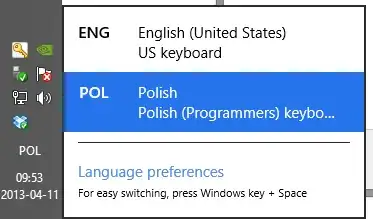
I have 2 languages installed on my PC. I have English set as display language and Polish used for Keyboard layout, date and time. (I just don't like Polish translation).

Because of that I'm able to switch keyboard layouts just by pressing [Win] + [Space], which is annoying.

Is there any way to remove ENG as keyboard layout and only use POL?
enter image description here enter image description here enter image description here

Hennes
  • 64,768
  • 7
  • 111
  • 168
Hooch
  • 3,843
  • 4
  • 24
  • 24

2 Answers2

1

Under Languages delete the Polski/Polish option. Then under the Options for the English display language, add Polish as an input method, after which you should be able to remove the US keyboard layout. This should give you the combination you're looking for, i.e. English as the display language and Polish as the keyboard layout.

Karan
  • 55,947
  • 20
  • 119
  • 191
  • 1
    There is one small probelm. I still want to have Polish date format, currency format, and digit separtor. All that "localization" info. – Hooch Apr 12 '13 at 08:49
  • 1
    Then change your **User Locale**. Open the **Region** Control Panel applet and change the format from "Match Windows display language" (English in your case) to Polish. See my answer [here](http://superuser.com/a/503165/138343) for details. – Karan Apr 12 '13 at 09:30
0

Move the polish keyboard up the list and delete english from the list i.e, do not click on Options to the right.

Sandokan
  • 220
  • 2
  • 3
  • 15