55

I'm creating a Visio 2013 diagram, and when I add a background colour to the diagram, the text of the arrow looks like this:

black arrow (on blue background) with black text (on a white rectangular background) overlaid

I want to remove that white text background, but I can't find how...

I found the solution for Visio 2007 in this post, but it doesn't work for Visio 2013, since there's no “Format” → “Text” menu. There's a “Format Shape” menu instead, but it contains only “Fill” and “Line”, no “Text”!

I tried to change the “Line” colour, and it changes the colour of the line (now is black), but I tried to change the “Fill” colour and it doen't change anything!

MikO
  • 1,387
  • 3
  • 13
  • 24

1 Answers1

92

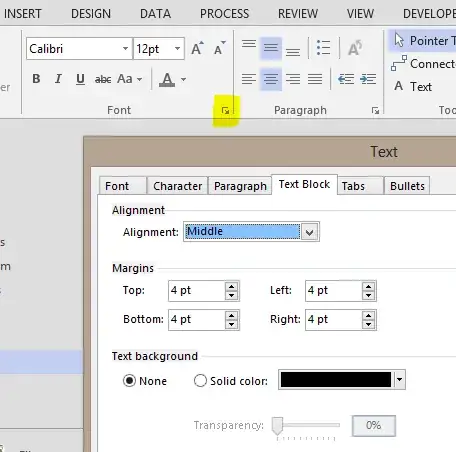
It's in the extended Font/Text properties, under Text Block:

enter image description here

Image source

Ƭᴇcʜιᴇ007
  • 111,883
  • 19
  • 201
  • 268
  • 6
    Thanks very much! I searched evrywhere but there... they couldn't hide it better :) – MikO Jun 11 '13 at 16:42
  • 2
    Yeah I find in general with the ribbon interface(s), if you can't find it, it's buried under one of those little arrows. :) – Ƭᴇcʜιᴇ007 Jun 11 '13 at 17:24
  • 2
    I would never have found this on my own. Awesome, thanks! – willem Feb 05 '14 at 09:22
  • 1
    I wish Visio would put this where it obviously belongs (i.e. right clicking the text) – Mike Wise Mar 09 '18 at 11:51
  • 1
    Works in Office 365 as well as of today. Also submitted feedback to Microsoft that this is too hard to find. – Paul Pehrson May 24 '18 at 22:39
  • 2
    If you're adjusting this using VBA, you can modify the connector object's shape sheet directly. With `vsoConnector` as a `Visio.Shape`, setting the background to transparent would be: `vsoConnector.CellsSRC(visSectionObject, visRowText, visTxtBlkBkgnd).FormulaU = "0"` – SmrtGrunt Oct 31 '18 at 17:39
  • @techie007 Is there anyway to have a small halo around the text ... diagram has the text and the underlying arrow in the same colour. Transparent merges the text and line together. – SteveC Feb 05 '20 at 13:08
  • Keep Solid Color to WHITE -- you would see the text along with the line like >----this way---> – HydTechie Feb 22 '21 at 17:03