2

Update: The original issue that spawned this question has been fixed, so this is now moot. I was unable to use Windows Update, as it'd throw error 800B0001 when I tried to use it, and would also ask to update Windows Update (which would also fail). After performing some manual patches and installing Microsoft FixIt 50528, it now works again! :)


I've been running into issues with Windows Update, which I can't seem to fix. The hotfixes don't work, nor does the Windows update readyness tool, or the manual SP1 upgrade. I get various esoteric errors which nobody seems to have a fix for. Looks like some of the update cache is corrupt and digital signatures seem to be broken on some packages / Windows Update components.

Long story short, I have discovered the only option is to do a repair operation on the OS, to repair everything. It's so corrupt that only a complete replacement will fix it.

According to various sources (including MSKB) one can perform a repair by running an in-place upgrade.

I've got the Windows 7 Ultimate retail disc, which I've inserted into my machine. I ran setup.exe and went through in the following order:

  • Install now
  • Go online to get latest updates (I've also tried not getting updates)
  • Wait for updates to be downloaded
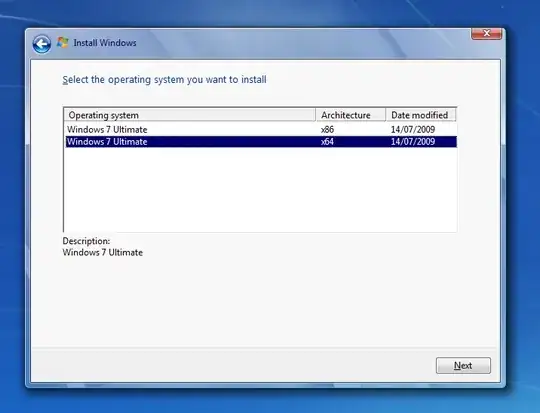
  • Select Windows 7 Ultimate (x64 architecture) and click next
  • Accept the T&Cs, click next
  • Click Upgrade

At this point it spends a minute on the "checking compatibility" screen, after which I get the following error:

The following issues are preventing Windows from upgrading. Cancel the upgrade, complete each task, and then restart the upgrade to continue.

  • You can’t upgrade 64-bit Windows to a 32-bit version of Windows. To upgrade, obtain a 64-bit version of the installation disc, or go online to see how to install Windows 7 and keep your files and settings.

  • 32-bit Windows cannot be upgraded to a 64-bit version of Windows. To upgrade, obtain a 32-bit version of the Windows installation disc.

It also mentions a warning about potential conflicts with a storage driver and VS2010, but that doesn't seem to be the blocking issue.

My currently installed version of Windows is Ultimate 64-bit (absolutely sure of this) and the disc is definitely a x86 / x64 combined Ultimate retail disc. There seem to be a few people who have run into this (e.g. this question), but I've not seen any answers. I've checked the event viewer, but can't spot anything in there that's related.

Any idea how I can get this working?

P.S: Just to pre-empt the inevitable "are you suuuuuuuuuuuuure it's x64 Ultimate?" questions:
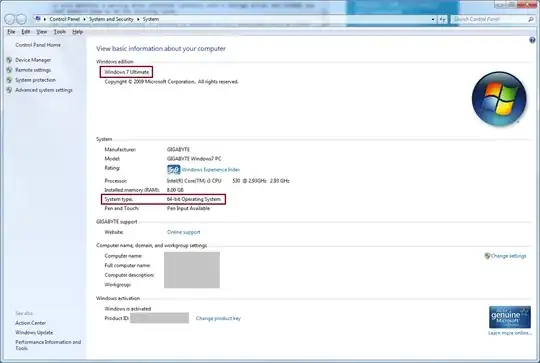
System Info

Installer architecture options

Polynomial
  • 1,399
  • 3
  • 13
  • 26
  • I recommend you use an original 64-bit Win7 DVD instead of this combined/AIO version you've created. – Karan Jun 26 '13 at 22:09
  • I've not created any "combined" disc. The original retail DVD comes with both x86 and x64. – Polynomial Jun 26 '13 at 22:10
  • Is this an OEM version or something? The boxed retail version I have definitely came with two separate DVDs. – Karan Jun 26 '13 at 22:13
  • The machine is a self-build, and Windows 7 Ultimate was provided as a bundle with the motherboard. It came in a retail box, with the normal looking insides, and only has one DVD. The only difference is that the OS comes with a pre-installed SLIC and key, like an OEM, for auto-activation. – Polynomial Jun 26 '13 at 22:18
  • Ok, so is it possible for you to test with a 64-bit only version from [here](http://superuser.com/questions/78761/where-do-i-download-windows-7-legally-from-microsoft)? If that doesn't help then most likely the current installation is corrupted in such a way that a clean install is the only solution. (BTW, I hope you tried `sfc /scannow` already before attempting the repair install?) – Karan Jun 26 '13 at 22:20
  • There's no SP1 integration on this disc - it's a standard pre-SP1 DVD. Doesn't look like there's a download for Ultimate x64 without SP1. I actually tried an ISO of that (had one handy from setting up a VM) and it said I need to install SP1 on the box before trying to upgrade, which fails due to afforementioned Windows Update issues. – Polynomial Jun 26 '13 at 22:24
  • @STTR: According to [these](http://social.technet.microsoft.com/Forums/windows/en-US/c0e78d7a-883d-4caa-a8c0-1e127a14612a/windows-7-home-premium-download) [two](http://forums.mydigitallife.info/threads/14709-Windows-7-Digital-River-direct-links-Multiple-Languages-X86-amp-X64/page60) pages **X17-24209.iso** is for **Windows 7 Home Premium x64 English**. – Karan Jun 26 '13 at 22:24
  • Found a better list of links [here](http://forums.mydigitallife.info/threads/14709-Windows-7-Digital-River-direct-links-Multiple-Languages-X86-amp-X64/page60), and `X17-24395.iso` is Win7 Ultimate 64-bit pre-SP1. (Edit: Uuugh, 3 hours to download, slow-ass server...) – Polynomial Jun 26 '13 at 22:31
  • @Karan ... wait download `X17-24395.iso` and test) – STTR Jun 26 '13 at 22:40
  • @STTR: I'm not gonna test, that's something for the OP to do. :) – Karan Jun 26 '13 at 22:42
  • @Polynomial: X17-24395.iso on that page is listed under Win 7 SP1. Note that Win 7 SP1 and Win 7 SP1 *Media Refresh* are two separate releases, with the latter being the latest one. Both have SP1 integrated though. I'm trying to find links to an RTM (pre-SP1) copy of Win7 Ultimate x64 myself. Keep in mind though that as I mentioned above it's quite possible this will all be for naught and the 64-bit only disc will also fail. Did you try sfc? – Karan Jun 26 '13 at 22:45
  • Yes, I've tried sfc, it just says it's waiting on a reboot for updates (when there are no updates waiting). – Polynomial Jun 26 '13 at 22:46
  • @Polynomial: Did you try [this Fixit](http://support.microsoft.com/kb/971058)? – Karan Jun 26 '13 at 22:48
  • @Karan Yup, no help. Tells me it's done a repair, but doesn't repair anything. Just goes back to "install an update to Windows Update", which fails all the same - error 800B0001 – Polynomial Jun 26 '13 at 22:51
  • @Polynomial: Did you try the **System Update Readiness Tool** as suggested [here](http://windows.microsoft.com/en-us/windows7/windows-update-error-800b0001)? – Karan Jun 26 '13 at 22:55
  • @Karan From my original question: *"The hotfixes don't work, nor does the Windows update readyness tool, or the manual SP1 upgrade"* - yes, I have already exhausted all options for the Windows Update issue. – Polynomial Jun 26 '13 at 22:59
  • X17-24395.iso finished downloading - it's SP1 integrated :( – Polynomial Jun 26 '13 at 23:00
  • @Polynomial: Ah, I missed that bit. As for the ISO, I told you the page clearly said it was SP1. Finding a link to the RTM version is proving quite difficult indeed, especially since two versions of SP1 have come out after it. I think you might have to do a clean install after all. Might be for the best and will ensure a completely stable system, that even a repair install might not be able to achieve. – Karan Jun 26 '13 at 23:00
  • @Polynomial Win+R `cmd` If run in cmd: `dir /A:- /S %windir%\Logs\CBS` what see? – STTR Jun 26 '13 at 23:04
  • @Karan you can find links to download both SP1 and SP0 Windows 7 ISOs [right here on Super User](http://superuser.com/a/305434/20088) – nhinkle Jun 26 '13 at 23:08
  • @nhinkle: SP0 *Ultimate*? – Karan Jun 26 '13 at 23:09
  • @Karan ah - I missed that there isn't a download link for Ultimate. You could however take the SP0 Windows 7 Pro disk and edit the `ei.cfg` file to make it work for Ultimate. – nhinkle Jun 26 '13 at 23:12
  • @nhinkle: True! Was concentrating so hard on obtaining the direct download link for Ultimate that I forgot about that. – Karan Jun 26 '13 at 23:13
  • 2
    @Polynomial: nhinkle's advice is perfect. Download Win7 RTM Professional or Home Premium ISO from [here](http://superuser.com/a/305434/138343), then use the [Windows 7 ISO Image Edition Switcher](http://code.kliu.org/misc/winisoutils/windows7_iso_image_edition_switcher.zip) (easy way) or edit the **ei.cfg** file manually to convert it to an Ultimate ISO. Hopefully a repair install will work, otherwise I've already told you the alternative more than once... – Karan Jun 26 '13 at 23:15
  • Ok, I'll take a look when I get home tonight. Cheers for the help so far all :) – Polynomial Jun 27 '13 at 09:48
  • **UPDATE:** Fixed the original issue, via FixIt 50528. See update to question and my self-answer. Seems everything else was just a wild goose chase. – Polynomial Jun 27 '13 at 17:40

1 Answers1

3

This issue has now become moot for me - I managed to get Windows Update working again!

So, for anyone with error 800B0001, do the following:

  • Download an run the Windows Update Readiness Tool
  • Run the KB971058 FixIt to ensure that supporting components have been appropriately patched.
  • Run Microsoft FixIt 50528 (KB822798) - this is the one that does a FULL repatch of Windows Update. It takes about an hour or two to run, and mostly sits at the "Configuring updates" screen.
  • Let the machine fully boot back up after, then immediately shut down and reboot again. It'll go through the update cache and properly install the last set of updates.
  • Log back in, go to Windows Update, click "Check for Updates" and wait for it to complete. It may ask you to install an update to Windows Update - if it does ask, do so, and reboot again.

This has resulted in me being able to get Windows Update working again!

Polynomial
  • 1,399
  • 3
  • 13
  • 26
  • Strange how Fix it 50528 helped you, considering it's listed on a page that supposedly only applies to Win2k, Server 2003 and XP! – Karan Jun 28 '13 at 17:15
  • Someone else commented in a (now deleted) answer that Fix-it 50528 also worked for Windows 7 64 bit, with Office 2013. – Arjan Feb 08 '14 at 14:36