37

This morning I started my Google Chrome browser as I do every day. The text size was suddenly bigger than normal, on all sites. I did not change any setting anywhere.

If I set the zoom to 90% it looks fine, but this breaks various things (e.g. Stack Exchange chat) so prefer to avoid it if possible.

Setting font size to Small in Chrome Settings also help, but it's too small.

I have uninstalled Chrome (deleting local data) and installed again, same thing. Tried beta channel as well, no change.

Windows 7 OS 64 bit, Display set to 125% from the very beginning. (Did not change this for years)

What could have caused this and how can it be solved?

This very question turns out to be a good example to demonstrate what I mean:
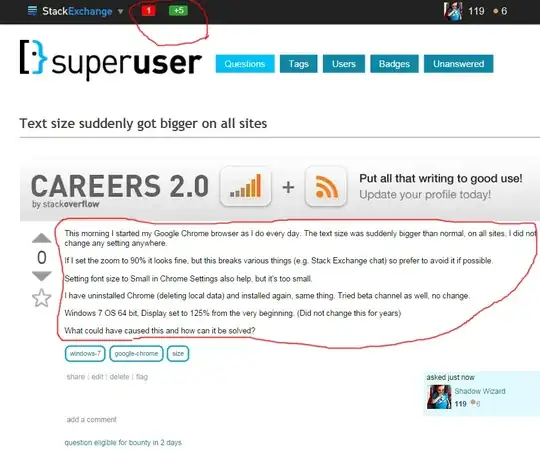
While the body itself is small (as I changed the font size in Settings), other things are still huge and not affected by the setting.

Sathyajith Bhat
  • 61,504
  • 38
  • 179
  • 264
Shadow The GPT Wizard
  • 587
  • 2
  • 11
  • 29

2 Answers2

45

This reddit thread seems to suggest that this is a Chrome bug. For now, a temporary workaround is to force HiDPI support in Chrome

To do this:

  1. Right click on the Chrome link
  2. Choose Properties and then add /high-dpi-support=1 /force-device-scale-factor=1 to the existing Link to your path to chrome.exe.
  3. Be sure to close all running chrome processes from the taskbar before re-running the shortcut with the flags

enter image description here

Ron Harlev
  • 709
  • 2
  • 12
  • 22
Sathyajith Bhat
  • 61,504
  • 38
  • 179
  • 264
  • 9
    Also, be sure to close all running chrome processes from the taskbar before re-running the shortcut with the flags – OpherV Aug 28 '14 at 13:35
  • So, are there any additional options for fixing this problem? Changing the shortcut settings is a rather limited fix, since it will only affect Chrome launched through that shortcut. Chrome launched through different shortcuts or in any other way will still be broken. Is there a registry-based or env variable-based fix that would apply that scale factor setting globally? – AnT stands with Russia Oct 10 '14 at 13:53
  • 1
    ... After further testing, no. `/force-device-scale-factor=1` setting breaks rendering of thin visual elements on some web sites. For example, thin lines separating topics on http://www.e90post.com/forums/forumdisplay.php?f=2 disappear completely when this setting is enabled. The lines are supposed to be there. – AnT stands with Russia Oct 10 '14 at 14:36
3

You can also fix this issue by turning off the "Disable DirectWrite" advanced setting in Chrome.

i.e. Disable the setting that is called "Disable DirectWrite". Do not Enable this setting.

Paste this into the Chrome address bar and turn off the setting:

  • chrome://flags/#disable-direct-write

When you are done, it should look like this:

enter image description here

Thanks to Ludwig on this bug report: