2

Recently i came across excel with cells filled with small cases,Is it there any easy way or macro to capitalize each word of the excel?

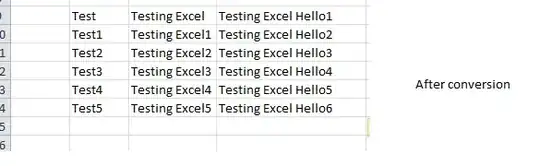
For E.g Consider the below image :

Before conversion

After conversion it should look like as below :

After conversion

I need to capitalize every cell[Entire cell] in excel with first letter as capital?any easy way to accomplish it?

BlueBerry - Vignesh4303
  • 8,129
  • 22
  • 68
  • 99
  • 1
    The "Proper" function can do what you want. E.g. Putting `=proper(H1)` in a helper cell will give `Upload File With Irregular Format` there. – K. Rmth Jul 07 '15 at 10:57
  • Do you want just the first letter of the cell in **Upper case**, or do you want every sentance to be **Title Case**? https://en.wikipedia.org/wiki/Letter_case – Dave Jul 07 '15 at 12:24

6 Answers6

6

There's no need to use VBA to change any cases. There are certainly VBA functions that do this as shown by other answers but, unless you're already writing something in VBA, this is overkill.

The following formulas will convert cases for you.

=UPPER(A1) converts all letters to uppercase
=LOWER(A1) converts all letters to lowercase
=PROPER(A1) converts the first letter of each word to uppercase and every other letter to lowercase
(A "word" is a consecutive string of letters. Any non-letter is considered the end of a word.)

Here are examples of the results:

Input:    Aaa bbb-ccc/ddd=eee9fff"ggg\hhh{iii(jjj
Upper:  AAA BBB-CCC/DDD=EEE9FFF"GGG\HHH{III(JJJ
Lower:  aaa bbb-ccc/ddd=eee9fff"ggg\hhh{iii(jjj
Proper: Aaa Bbb-Ccc/Ddd=Eee9Fff"Ggg\Hhh{Iii(Jjj

If you want to capitalize only the first letter of a cell, combine UPPER with some other functions:
=UPPER(LEFT(A1)) & MID(A1,2,LEN(A1))

Engineer Toast
  • 4,955
  • 1
  • 20
  • 33
  • Sorry, how does this work? I mean, if I have a value in A1, and want to keep that value in A1, how can I use a worksheet formula? Or would I need to copy everything else where, and then copy it back (which is easy enough) – Dave Jul 07 '15 at 13:06
  • If you want to keep it in the same cell then you are correct. You must create a second column with the formulas and then copy / paste values over the original data. That's the only drawback against VBA: It can't edit the data in-place. – Engineer Toast Jul 07 '15 at 13:18
  • ... This is probably a better solution than mine as it is probably more accessible +1 – Dave Jul 07 '15 at 13:21
  • Agree, with `proper` being the better choice now, unless the need is only for the first word. +1 – Raystafarian Jul 16 '15 at 11:35
2

I need to capitalize every cell in excel with first letter as capital?any easy way to accomplish it?

Yes, use this macro. Remember to take a back up of the file first!

Sub uppercase()

For Each cell In Application.ActiveSheet.UsedRange
    If (cell.Value <> "") Then
         cell.Value = UCase(cell.Value) ' this will make the entire cell upper case
    End If
Next

End Sub

To make the first letter of each cell upper case you'd use

cell.Value = UCase(Left(cell.Value, 1)) & Right(cell.Value, Len(cell.Value) - 1)               'This will make the first word in the cell upper case

To make it title case, use

Sub titleCase()

For Each cell In Application.ActiveSheet.UsedRange
    If (cell.Value <> "") Then
         cell.Value = TitleCase(cell.Value) ' this will make the entire cell upper case
    End If
Next

End Sub


Function TitleCase(s) As String
a = Split(s, " ")

For i = 0 To UBound(a)
    If (Trim(a(i)) <> "") Then
      TitleCase = TitleCase & UCase(Left(a(i), 1)) & Right(a(i), Len(a(i)) - 1) & " "
    End If
Next
TitleCase = Trim(TitleCase)
End Function

How do I add VBA in MS Office?
Dave
  • 25,297
  • 10
  • 57
  • 69
2

Here is a simple macro to convert text in a range to all CAPS. Change the range on the 3rd line to the range you want to convert.

Sub Uppercase()
   ' Loop to cycle through each cell in the specified range.
   For Each x In Range("A1:A25")
      ' Change the text in the range to uppercase letters.
      x.Value = UCase(x.Value)
   Next
End Sub
CharlieRB
  • 22,566
  • 5
  • 56
  • 105
0

Simplest is to make your own function (New York, hence it was the first capital of the USA....)

Function NewYork(InputText As String)

NewYork = UCase(Left(InputText , 1)) & Right(InputText , Len(InputText ) - 1)

End Function

0

You can also copy necessary data into a Microsoft Word document and change the letter cases using the "Aa" button in the Home > Font tab. Then just copy and paste back into Excel.

-2

Use LibreOffice! You can open, change and save Excel files. 1. Select the cells you want to change 2. Point at Format > Text > Change Case > Capitalize Every Word Simples.