By default, only the most recently used plan as well as "balanced" are available. How do I display all 3 default power plans? I'd like to avoid third party programs if possible.
Asked
Active
Viewed 1.4k times

8 Answers
6
Shameless plug: Power Buddy
Power Buddy is a very lightweight system tray application that allows you to switch between all the defined power plans.
No malware. No junk.
Full Disclosure: I am the author of this project.

G-Man Says 'Reinstate Monica'
- 7,678
- 22
- 41
- 87

MetaFight
- 213
- 3
- 5
-
This was simple, and automatically populated with all my power plans into a tray context menu. Good suggestion – cellepo Jan 13 '16 at 20:54
-
Warning: [a user reported](//superuser.com/review/suggested-edits/649224) his experience that Windows Defender reported a Trojan in the installer for Power Buddy. – G-Man Says 'Reinstate Monica' Apr 26 '17 at 20:40
-
1@G-Man **Update:** The trojan false-positive has been fixed: https://github.com/PerfectlyCromulentLtd/PowerBuddy/issues/12 – MetaFight May 04 '17 at 15:31
3
Windows 7 has no natural settings to show more than 2 power plans in the system tray. However, you can create shortcuts or hotkeys to switch between your power plans. How-to Geek has a nice article about how to do that: Create a Shortcut or Hotkey to Switch Power Plans.
One of the users in a forum having the same question as you says that this solution is perfect; but each time he ran the shortcut, the command prompt popped up for a second. To prevent this he created a small script. You can see the related post here.
There is also a Windows sidebar gadget which can do what you want. It's called Power Scheme and can be downloaded from this page.
Although you avoid 3rd party solutions, there is a tool called Power Plan Assistant for Windows® 7 which can do the job as well.
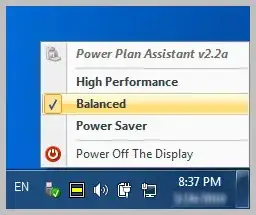

Gaff
- 18,569
- 15
- 57
- 68

Mehper C. Palavuzlar
- 55,164
- 49
- 193
- 250
-
2Note that Power Plan Assistant is nagware. After one week of use, the software disables itself, and you're required to download a new version from the website and to install it again. You have to repeat this every week as long as you keep using it. – phsource Oct 27 '11 at 03:35
-
A good alternative I've found is BatteryCare, at http://batterycare.net/en/download.html – phsource Dec 06 '11 at 01:35
-
Battery Care has already been suggested as an answer to the question: http://superuser.com/a/162697/13567 – Mehper C. Palavuzlar Dec 06 '11 at 07:38
2
I would recommend Battery Care, a freeware tool that does more than allowing you to easily change the power plans (Power Saver, Balanced and High Performance) . See this Battery Care review

Nicu Zecheru
- 5,492
- 7
- 33
- 46
-
Could you write a bit more about it, especially in comparison with Power Plan Assistant? – mafu Jul 29 '10 at 08:58
2
Just use the shortcut key WIN+X which will bring up the mobility center; then you may choose the power plan you want. very simple!!


-
-
This is 4 strokes/click + a large menu select. compared to in Win10: 6 clicks using the stock battery guage notification/tray icon. So this is not much of a comparative savings in Win10. – cellepo Jan 13 '16 at 20:52
1
Have you looked at Power Plan Assistant
Searching for 'show all 3 power plans in tray software'? Congratulations, you just have found a comprehensive solution. Power Plan Assistant for Windows 7 is an ultimate manual / automatic power plan switcher and a compact (yet very informative) system Power icon replacement. It's the multiple award-winning, the world's smartest power management tool. Blockquote

Pulse
- 4,523
- 2
- 19
- 20
1
Battery Care installs malware along with it. You can opt out (although not obviously at first glance). I would discourage users from installing software that bundles malware. The author gets barely enough to buy a beer per year from that stuff and it only serves as a distribution point for malware and spyware. It needs to end.
Here's an alternative that doesn't bundle any malware.


1
I'll throw in a late update to this, Power Scheme Switcher, under the MIT license with source code available from the same place. Built in C# on Visual Studio 2012.

fencepost
- 1,106
- 7
- 9
0
See my answer to this an other question, on how to create your own Power Scheme switcher menu, using only Windows built-in features :
https://superuser.com/a/1631250/711015
That way you can show and have access to switch to any number of schemes.

mach128x
- 460
- 1
- 5
- 14